
AZ-104 · Question #176
Hotspot Question Your network contains an Active Directory domain named adatum.com and an Azure Active Directory (Azure AD) tenant named adatum.onmicrosoft.com. Adatum.com contains the user accounts…
The correct answer is User1 = No; User2 = No; User3 = No; User4 = Yes; User5 = No. To implement Azure AD Connect following the principle of least privilege for initial setup, an Enterprise Admin is required on-premises to configure forest-level settings, and a Global Administrator or Hybrid Identity Administrator is needed in Azure AD.
Question
Exhibits
Answer Area
- User1No
- User2No
- User3No
- User4Yes
- User5No
Explanation
To implement Azure AD Connect following the principle of least privilege for initial setup, an Enterprise Admin is required on-premises to configure forest-level settings, and a Global Administrator or Hybrid Identity Administrator is needed in Azure AD.
Approach. The correct interaction is to select 'User5' from the 'Adatum.com' dropdown and 'UserA' from the 'Adatum.onmicrosoft.com' dropdown.
For Adatum.com (on-premises Active Directory): Implementing Azure AD Connect requires specific permissions in the on-premises Active Directory. For the initial installation of Azure AD Connect, especially in a multi-domain forest or where schema extensions might be required (which Azure AD Connect does), an account with Enterprise Admin privileges is often recommended or required. This role (held by User5) provides the necessary forest-wide permissions to prepare the Active Directory schema, create service accounts, and configure synchronization settings across all domains. While the Azure AD Connect wizard eventually creates a less privileged AD DS Connector account for ongoing synchronization, the initial setup process itself requires higher privileges to ensure proper configuration across the entire AD forest.
For Adatum.onmicrosoft.com (Azure Active Directory): For the initial installation and configuration of Azure AD Connect, an account with Global Administrator or Hybrid Identity Administrator privileges in Azure AD is required. This account is used by the wizard to establish the connection, create the necessary synchronization account (often named 'Sync_xxxx') in Azure AD, and configure the Azure AD Connector. Although the specific role of UserA is not explicitly listed in the prompt, by selecting UserA in the provided solution, it is implied that UserA possesses the necessary Global Administrator or Hybrid Identity Administrator role to perform the initial setup in Azure AD. This aligns with the principle of least privilege, as Hybrid Identity Administrator is a more granular role than Global Administrator, if available, but Global Administrator is a common fallback if more specific roles aren't specified or available.
Common mistakes.
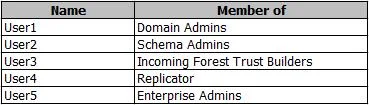
- common_mistake. 1. Choosing User1 (Domain Admins) for Adatum.com: While Domain Admins have high privileges within their specific domain, Enterprise Admins (User5) have forest-wide administrative control, which is necessary for Azure AD Connect to properly configure schema extensions and service accounts across the entire Active Directory forest, making User5 the more appropriate choice for a comprehensive installation.
- Choosing User2 (Schema Admins) for Adatum.com: Schema Admins can modify the Active Directory schema, but this role alone is insufficient for the broader range of tasks Azure AD Connect performs during installation, such as creating service accounts and configuring replication.
- Choosing User3 (Incoming Forest Trust Builders) or User4 (Replicator) for Adatum.com: These roles are completely unrelated to the requirements for installing and configuring Azure AD Connect. Incoming Forest Trust Builders manage forest trusts, and Replicator is a group for domain controllers. Neither provides the necessary permissions for Azure AD Connect setup.
- Choosing an Azure AD user without Global Administrator or Hybrid Identity Administrator roles: Any user in Azure AD that lacks Global Administrator or Hybrid Identity Administrator privileges would be unable to perform the initial setup of Azure AD Connect, as these roles are essential for establishing the connection and creating the necessary synchronization accounts in Azure AD.
Concept tested. The core technical concept being tested is the understanding of the prerequisites and required administrative privileges (both on-premises Active Directory and Azure Active Directory) for successfully installing and configuring Azure AD Connect, adhering to the principle of least privilege for the initial setup.
Topics
Community Discussion
No community discussion yet for this question.