
AZ-104 · Question #160
Hotspot Question You have an Azure subscription. You need to implement a custom policy that meet the following requirements: Ensures that each new resource group in the subscription has a tag named…
The correct answer is policyRule.if.allOf.field:type.equals: "Microsoft.Resources/subscriptions/resourceGroups"; policyRule.then.effect: "Append". The policy should target resource groups and use the 'DeployIfNotExist' effect to ensure new resource groups have the specified tag, allow their creation, and enable accurate compliance reporting with remediation capabilities.
Question
Exhibit
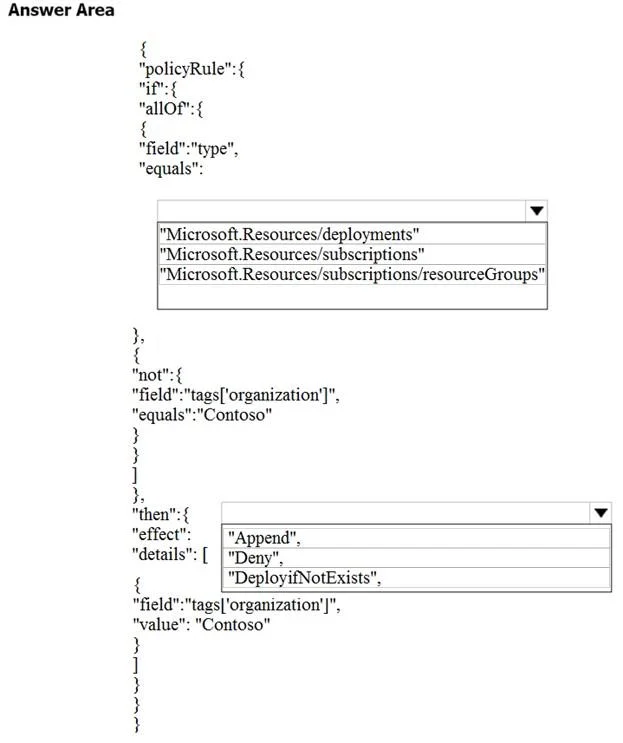
Answer Area
- policyRule.if.allOf.field:type.equals"Microsoft.Resources/subscriptions/resourceGroups""Microsoft.Resources/deployments""Microsoft.Resources/subscriptions""Microsoft.Resources/subscriptions/resourceGroups"
- policyRule.then.effect"Append""Append""Deny""DeployifNotExists"
Explanation
The policy should target resource groups and use the 'DeployIfNotExist' effect to ensure new resource groups have the specified tag, allow their creation, and enable accurate compliance reporting with remediation capabilities.
Approach. To complete the policy correctly, two selections must be made:
-
First Dropdown (Resource Type): The question requires the policy to apply to 'each new resource group'. Therefore, the
fieldwithtypeshould target resource groups. The correct option is"Microsoft.Resources/subscriptions/resourceGroups". This precisely identifies resource groups as the scope of the policy's evaluation. -
Second Dropdown (Effect): The policy needs to 'Ensure that each new resource group... has a tag named organization set to a value of Contoso' AND 'Ensures that resource group can be created from the Azure portal' AND 'Ensures that compliance reports in the Azure portal are accurate'.
- The
ifcondition (specifically thenotclause) checks if the tagorganizationis not set toContoso. "Deny"is incorrect because it would prevent resource group creation if the tag is missing or incorrect, violating the 'can be created' requirement."Append"can add a tag during resource creation if it's missing, but it cannot modify an existing tag with an incorrect value, nor does it provide remediation for existing non-compliant resources."DeployIfNotExist"is the most appropriate effect. It allows resource creation. If theifcondition (tag not present or incorrect) is met, it can trigger a deployment to add or correct the tag. Crucially,DeployIfNotExistsupports remediation tasks, which can be run on existing non-compliant resources to bring them into compliance, directly contributing to 'accurate compliance reports' by actively fixing non-compliance, not just reporting it or denying it. Thedetailssection shown, withfieldandvaluefor the tag, aligns with howDeployIfNotExistcan specify the desired state to achieve via deployment.
- The
Common mistakes.
- common_mistake. 1. Selecting
"Deny"as the effect: This is a common mistake. WhileDenywould enforce the tag, it would prevent resource group creation if the tag is missing or incorrect, which directly contradicts the requirement that 'resource group can be created from the Azure portal'.
- Selecting
"Append"as the effect: WhileAppendcan add a missing tag during resource creation, it has limitations. It won't modify an existing tag with an incorrect value, and it doesn't support remediation tasks for existing non-compliant resources.DeployIfNotExistis superior for ensuring tag compliance and accurate reporting through remediation. - Selecting an incorrect resource type: Choosing
"Microsoft.Resources/deployments"or"Microsoft.Resources/subscriptions"for the first dropdown would target the wrong resource type, leading the policy to evaluate deployments or subscriptions instead of resource groups.
Concept tested. Azure Policy definition structure, understanding policy rules (if conditions), resource types, and policy effects (Append, Deny, DeployIfNotExist), particularly in the context of enforcing tags on resource groups and enabling remediation for compliance.
Reference. null
Topics
Community Discussion
No community discussion yet for this question.