
Microsoft
AZ-104 · Question #146
SIMULATION Overview The following section of the exam is a lab. In this section, you will perform a set of tasks in a live environment. While most functionality will be available to you as it would…
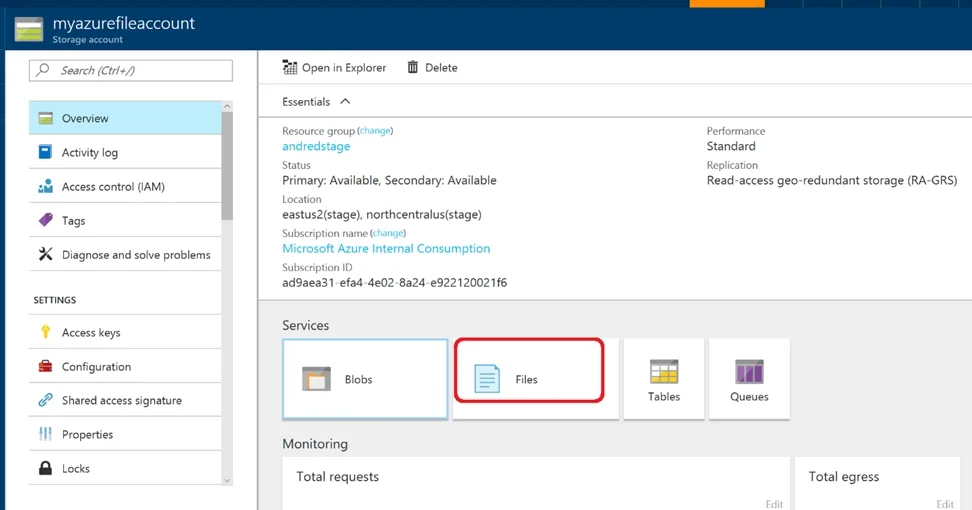
The correct answer is A. See below explanation. Step 1. Go to the Storage Account blade on the Azure portal: Step 2. Click on add File Share button: Step 3. Provide Name (storagelod8095859) and Quota (250 GB). https://docs.microsoft.com/en-us/azure/storage/files/storage-how-to-create-file-share
Submitted by chen.hong· Mar 4, 2026Deploy and manage Azure compute resources
Question
SIMULATION Overview The following section of the exam is a lab. In this section, you will perform a set of tasks in a live environment. While most functionality will be available to you as it would be in a live environment, some functionality (e.g., copy and paste, ability to navigate to external websites) will not be possible by design. Scoring is based on the outcome of performing the tasks stated in the lab. In other words, it doesn't matter how you accomplish the task, if you successfully perform it, you will earn credit for that task. Labs are not timed separately, and this exam may have more than one lab that you must complete. You can use as much time as you would like to complete each lab. But, you should manage your time appropriately to ensure that you are able to complete the lab(s) and all other sections of the exam in the time provided. Please note that once you submit your work by clicking the Next button within a lab, you will NOT be able to return to the lab. To start the lab You may start the lab by clicking the Next button. Your company plans to host in Azure the source files of several line-of-business applications. You need to create an Azure file share named corpsoftware in the storagelod8095859 storage account. The solution must ensure the corpsoftware can store only up to 250 GB of data. What should you do from the Azure portal?
Exhibit
Options
- ASee below explanation
How the community answered
(53 responses)- A100% (53)
Explanation
Step 1. Go to the Storage Account blade on the Azure portal: Step 2. Click on add File Share button: Step 3. Provide Name (storagelod8095859) and Quota (250 GB). https://docs.microsoft.com/en-us/azure/storage/files/storage-how-to-create-file-share
Community Discussion
No community discussion yet for this question.