
AI-102 · Question #403
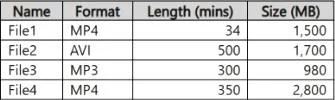
You have a computer that contains the files shown in the following table. Which files can you upload and analyze by using Azure AI Video Indexer?
The correct answer is D. File1, File2, and File3 only. Note: Azure AI Video Indexer supports a wide range of video and audio file formats, including AVI, FLV, ISMV, Matroska, MP4, MXF, MPEG2-TS, QuickTime, WAVE/WAV, and Windows Media Video/ASF. File size limits depend on whether you're uploading from your device or from a URL; the…
Question
Exhibit
Options
- AFile1 only
- BFile3 only
- CFile1 and File3 only
- DFile1, File2, and File3 only
- EFile1, File2, File3, and File4
How the community answered
(56 responses)- A2% (1)
- B5% (3)
- C2% (1)
- D91% (51)
Explanation
Note: Azure AI Video Indexer supports a wide range of video and audio file formats, including AVI, FLV, ISMV, Matroska, MP4, MXF, MPEG2-TS, QuickTime, WAVE/WAV, and Windows Media Video/ASF. File size limits depend on whether you're uploading from your device or from a URL; the device upload limit is 2 GB, while the URL upload limit is 30 GB. MP3 (MPEG-1 Audio Layer 3) audio file is also supported. File duration limit The file duration limit is 6 hours for all presets with the exclusion of the Basic Audio preset which has a file duration limit of 12 hours. https://learn.microsoft.com/en-us/azure/azure-video-indexer/avi-support-matrix
Topics
Community Discussion
No community discussion yet for this question.