
AI-102 · Question #355
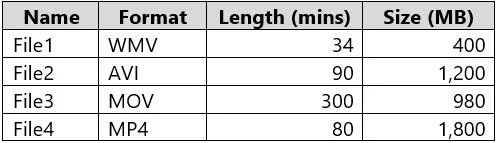
You have a local folder that contains the files shown in the following table. You need to analyze the files by using Azure AI Video Indexer. Which files can you upload to the Video Indexer website?
The correct answer is B. File1, File2, File3 and File4. File1 (WMV, 34 mins, 400 MB): Supported because it uses a supported format (WMV), is under the 2 GB size limit, and has a duration of less than 6 hours. File2 (AVI, 90 mins, 1,200 MB): Supported because it uses a supported format (AVI), is under the 2 GB size limit, and has a…
Question
Exhibit
Options
- AFile1 and File3 only
- BFile1, File2, File3 and File4
- CFile1, File2, and File3 only
- DFile1 and File2 only
- EFile1, File2, and File4 only
How the community answered
(24 responses)- A4% (1)
- B96% (23)
Explanation
File1 (WMV, 34 mins, 400 MB): Supported because it uses a supported format (WMV), is under the 2 GB size limit, and has a duration of less than 6 hours. File2 (AVI, 90 mins, 1,200 MB): Supported because it uses a supported format (AVI), is under the 2 GB size limit, and has a duration of less than 6 hours. File3 (MOV, 300 mins, 980 MB): Supported because it uses a supported format (MOV), is under the 2 GB size limit, and has a duration of 5 hours (less than the 6-hour limit). File4 (MP4, 80 mins, 1,800 MB): Supported because it uses a supported format (MP4), is under the 2 GB size limit, and has a duration of less than 6 hours. https://learn.microsoft.com/en-us/azure/azure-video-indexer/avi-support-matrix
Topics
Community Discussion
No community discussion yet for this question.