
AI-102 · Question #366
Drag and Drop Question You have an Azure subscription that contains an Azure AI Document Intelligence resource named DI1 and a storage account named sa1. The sa1 account contains a blob container…
The correct answer is Upload the forms and JSON files to blob1.; Create a shared access signature (SAS) URL for blob1.; Call the Build model REST API function.; Call the Get model REST API function. To train a custom Document Intelligence model, you must first upload training data (forms and JSON labels) to Azure Blob Storage (blob1), because Document Intelligence only supports Azure Blob Storage as a training data source - not Azure Files (share1). You then generate a SAS…
Question
Exhibit
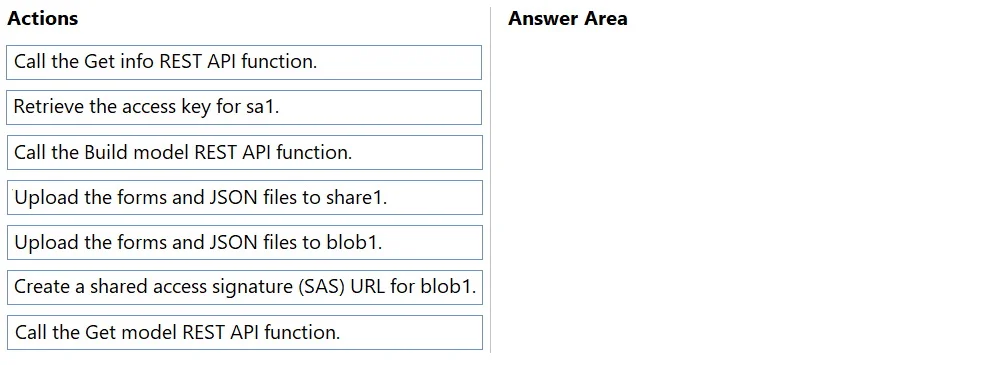
Answer Area
Drag items
Correct arrangement
- Upload the forms and JSON files to blob1.
- Create a shared access signature (SAS) URL for blob1.
- Call the Build model REST API function.
- Call the Get model REST API function.
Explanation
To train a custom Document Intelligence model, you must first upload training data (forms and JSON labels) to Azure Blob Storage (blob1), because Document Intelligence only supports Azure Blob Storage as a training data source - not Azure Files (share1). You then generate a SAS URL for blob1 to grant Document Intelligence secure, time-limited access to the container, call the Build Model REST API to initiate training using that SAS URL, and finally call the Get Model REST API to retrieve the trained model's ID and confirm its status. This sequence ensures proper data accessibility and correct API orchestration.
Topics
Community Discussion
No community discussion yet for this question.