
AI-102 · Question #338
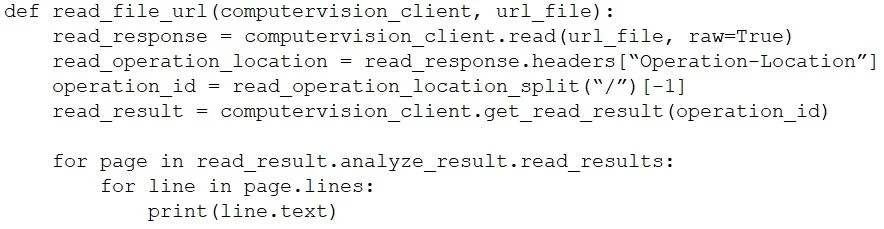
You are developing a method that uses the Azure AI Vision client library. The method will perform optical character recognition (OCR) in images. The method has the following code. During testing…
The correct answer is B. Add code to verify the read_results.status value. D. Wrap the call to get_read_result within a loop that contains a delay. To ensure the get_read_result method waits for an Azure AI Vision OCR operation to complete, you must repeatedly check the operation status and introduce a delay to avoid excessive polling.
Question
Exhibit
Options
- ARemove the operation_id parameter.
- BAdd code to verify the read_results.status value.
- CAdd code to verify the status of the read_operation_location value.
- DWrap the call to get_read_result within a loop that contains a delay.
How the community answered
(59 responses)- A15% (9)
- B54% (32)
- C31% (18)
Why each option
To ensure the `get_read_result` method waits for an Azure AI Vision OCR operation to complete, you must repeatedly check the operation status and introduce a delay to avoid excessive polling.
The `operation_id` parameter is essential for identifying and retrieving the results of a specific asynchronous OCR operation; removing it would make it impossible to get the results.
The `read_results.status` field (or similar field in the API response, often `status` or `readResult.status`) indicates the current state of the asynchronous OCR operation (e.g., 'notStarted', 'running', 'succeeded', 'failed'); checking this status allows the application to determine when the operation has finished.
While `read_operation_location` contains the URL to poll for results, verifying its status value is not the direct way to check the *completion status* of the OCR operation itself; the *response from that URL* contains the actual status.
Wrapping the call to `get_read_result` within a loop that contains a delay (e.g., using `time.sleep()`) implements a polling mechanism, preventing the client from continuously querying the service and providing time for the asynchronous OCR operation to complete.
Concept tested: Asynchronous operation polling for Azure AI Vision OCR
Source: https://learn.microsoft.com/en-us/azure/ai-services/computer-vision/quickstarts-sdk/image-analysis-client-library-40?tabs=windows%2Cterminal&pivots=programming-language-python#optical-character-recognition-ocr
Topics
Community Discussion
No community discussion yet for this question.