
AI-102 · Question #30
You need to upload speech samples to a Speech Studio project. How should you upload the samples?
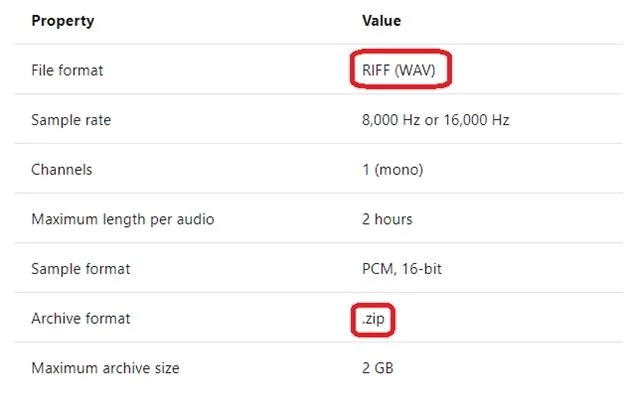
The correct answer is B. Upload a .zip file that contains a collection of audio files in the .wav format and a corresponding. To upload your data, navigate to the Speech Studio . From the portal, click Upload data to launch the wizard and create your first dataset. You'll be asked to select a speech data type for your dataset, before allowing you to upload your data. The default audio streaming format…
Question
Exhibit
Options
- ACombine the speech samples into a single audio file in the .wma format and upload the file.
- BUpload a .zip file that contains a collection of audio files in the .wav format and a corresponding
- CUpload individual audio files in the FLAC format and manually upload a corresponding transcript
- DUpload individual audio files in the .wma format.
How the community answered
(18 responses)- A6% (1)
- B72% (13)
- C17% (3)
- D6% (1)
Explanation
To upload your data, navigate to the Speech Studio . From the portal, click Upload data to launch the wizard and create your first dataset. You'll be asked to select a speech data type for your dataset, before allowing you to upload your data. The default audio streaming format is WAV Use this table to ensure that your audio files are formatted correctly for use with Custom Speech: https://docs.microsoft.com/en-us/azure/cognitive-services/speech-service/how-to-custom-speech-
Topics
Community Discussion
No community discussion yet for this question.