
AI-102 · Question #205
SIMULATION You need to add a question pair to the published knowledge base used by a QnA Maker service named QNA12345678. The question must be: What will be the next version of Windows? The answer…
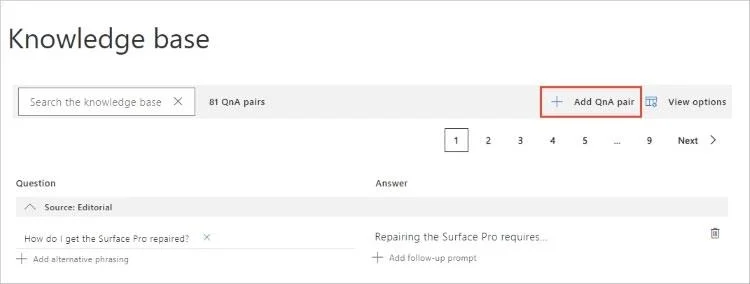
The task requires adding a new question and answer pair to an existing QnA Maker knowledge base by clicking the '+ Add QnA pair' button in the QnA Maker portal.
Question
What will be the next version of Windows? The answer must be: Windows 11. To complete this task, sign in to the QnA Maker portal. Answer: Step 1: Sign in to the QnA portal, then select the knowledge base to add the QnA pair to. Step 2: On the EDIT page of the knowledge base, select Add QnA pair to add a new QnA pair. Step 3: In the new QnA pair row, add the required question and answer fields. The other fields are optional. All fields can be changed at any time. Question: What will be the next version of Windows? Step 4: Select Save and train to see predictions including the new QnA pair. Reference: https://docs.microsoft.com/en-us/azure/cognitive-services/qnamaker/how-to/edit-knowledge-baseExhibit
Explanation
The task requires adding a new question and answer pair to an existing QnA Maker knowledge base by clicking the '+ Add QnA pair' button in the QnA Maker portal.
Approach. The correct interaction is to click the '+ Add QnA pair' button, which is highlighted in red in the exhibit image. The simulation instructions explicitly state, 'On the EDIT page of the knowledge base, select Add QnA pair to add a new QnA pair.' This button directly corresponds to the action required to add a new question and answer entry to the knowledge base. After clicking this button, new empty fields would appear, allowing the test-taker to input the specified question ('What will be the next version of Windows?') and answer ('Windows 11').
Common mistakes.
- common_mistake. Common mistakes might include attempting to use the search bar, clicking 'Add alternative phrasing' or 'Add follow-up prompt' associated with an existing QnA pair, or interacting with the pagination controls.
- why_incorrect. Clicking the 'Search the knowledge base' bar is incorrect because it's for finding existing entries, not creating new ones. 'Add alternative phrasing' is for adding additional ways to ask an existing question, and 'Add follow-up prompt' is for guiding the conversation after an existing answer, neither of which creates a new, independent QnA pair. Interacting with pagination ('Next', page numbers) is for navigating through the list of existing pairs, not for adding new content. The trash can icon would delete an existing entry, which is the opposite of the task's objective.
Concept tested. The core concept being tested is the ability to manage and update content within an Azure QnA Maker knowledge base, specifically adding new question-and-answer pairs through the QnA Maker portal's user interface.
Reference. https://docs.microsoft.com/en-us/azure/cognitive-services/qnamaker/how-to/edit-knowledge-base
Topics
Community Discussion
No community discussion yet for this question.