
AI-102 · Question #189
SIMULATION Use the following login credentials as needed: - To enter your username, place your cursor in the Sign in box and click on the username below. - To enter your password, place your cursor…
Azure Cognitive Services Deployment - Exam Explanation --- Overall Goal & Why This Approach The task is to deploy an Azure Cognitive Services resource that can analyze images and identify specific products (Surface Pro / Surface Studio). The correct service is Computer Vision…
Question
Exhibit
Explanation
Azure Cognitive Services Deployment - Exam Explanation
Overall Goal & Why This Approach
The task is to deploy an Azure Cognitive Services resource that can analyze images and identify specific products (Surface Pro / Surface Studio). The correct service is Computer Vision (part of Azure AI Services), which uses the Image Analysis and tagging features to recognize thousands of objects - including branded products like Microsoft Surface devices.
You deploy this through the Azure portal by creating a Cognitive Services resource because that umbrella resource gives you access to the Computer Vision API endpoint and keys needed to build your custom API on top of it.
Step-by-Step Reasoning
Step 1 - Click "Create a resource" This opens the Azure Marketplace, which is the only place to provision new Azure services. Skipping this and trying to navigate directly to Cognitive Services won't give you a creation workflow - you'd only see existing resources.
Step 2 - Search for "Cognitive Services" Azure has dozens of AI service types. Searching specifically for Cognitive Services targets the multi-service AI resource that bundles Computer Vision under one endpoint. If you searched for something too narrow (e.g., "Custom Vision") you'd get a different, less appropriate service. The legal notice you accept here governs Microsoft's responsible AI terms - you must accept it to proceed.
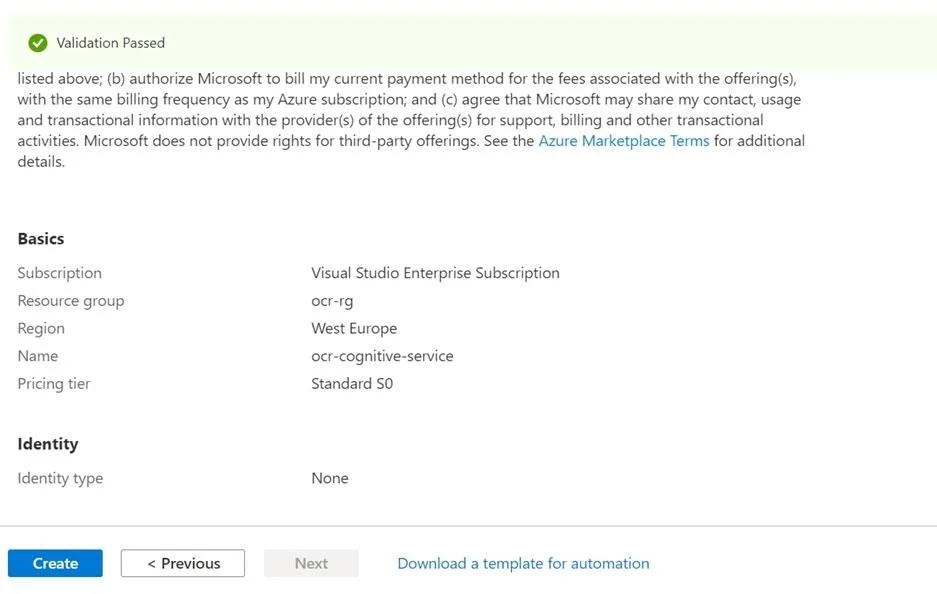
Step 3 - Fill in configuration details Each field is a hard requirement:
- Subscription: determines billing; must be valid or deployment will fail
- Resource Group: a logical container for managing related resources together; required before the resource can be saved
- Region = East US: the question explicitly requires this. Choosing the wrong region fails the exam objective and could affect latency or data residency
- Name = AAA12345678: must match exactly - Azure resource names are used in API URLs and are often validated by the exam grader
- Pricing Tier = Free: the question specifies Free; choosing Standard or another tier would technically work but fails the requirement and incurs cost
If any of these are wrong, the resource is created in an invalid state for the exam - even if Azure itself doesn't reject it.
Step 4 - Review + Create, then navigate to the resource The Review + Create tab runs Azure's final validation pass (quota checks, name uniqueness, region availability). Skipping straight to "Create" without reviewing risks missing validation errors. After deployment completes (~1-2 min), navigating to the resource lets you retrieve the API key and endpoint, which are required to actually call the Computer Vision API from your application.
What Goes Wrong If Steps Are Skipped
| Skipped Step | Consequence |
|---|---|
| Wrong region | Resource exists but fails exam objective; may also cause latency issues |
| Wrong name | Exam grader won't find AAA12345678; auto-fail |
| Wrong pricing tier | Cost incurred or quota mismatch; fails the requirement |
| Not navigating to resource | You never get the endpoint/key needed to build the API |
Helpful Memory Tip
"C-R-N-P" - Create, Region, Name, Pricing
When provisioning any Azure AI resource on an exam, always verify these four things in order: you Created the right service type, set the right Region, entered the exact Name, and picked the correct Pricing tier. These are the four fields most commonly tested and most commonly wrong.
Topics
Community Discussion
No community discussion yet for this question.