
AI-102 · Question #186
SIMULATION You need to create a search service named search12345678 that will index a sample Azure Cosmos DB database named hotels-sample. The solution must ensure that only English language fields…
Explanation: Azure AI Search - hotels-sample Indexing Simulation --- Overall Goal You are setting up Azure AI Search (formerly Azure Cognitive Search) to make a sample Cosmos DB dataset (hotels-sample) searchable, with a constraint: only English-language analyzer fields should…
Question
Exhibit
Explanation
Explanation: Azure AI Search - hotels-sample Indexing Simulation
Overall Goal
You are setting up Azure AI Search (formerly Azure Cognitive Search) to make a sample Cosmos DB dataset (hotels-sample) searchable, with a constraint: only English-language analyzer fields should be retrievable. This is a foundational Azure search scenario - connecting a data source, creating an index, and configuring language-specific field behavior.
Why This Approach Is Correct
Azure AI Search uses a wizard-based import pipeline that bundles three concerns in one flow:
- Data source connection (where the raw data lives)
- Skillset (optional enrichment via AI)
- Index (the searchable schema with field configuration)
Doing this through the portal wizard is the fastest correct path for a simulation exam because it handles the indexer creation automatically.
Step-by-Step Reasoning
Step 1 - Sign in to the portal Required to authenticate and access Azure resources. Without this, no resource creation is possible.
Step 2 - Create an Azure Cognitive multi-service resource This provisions the underlying Azure AI Search service itself. The multi-service resource gives access to cognitive skills (OCR, language detection, etc.) under one billing umbrella. Skipping this means you have nowhere to host the index.
Note: The question uses older terminology ("Azure Cognitive multi-service"). In current portal UI this is Azure AI Search. The exam is testing the concept, not the exact menu label.
Step 3 - Name it search12345678
The name must match exactly - search service names are globally unique DNS identifiers (e.g., search12345678.search.windows.net). A wrong name fails the simulation grader.
Step 4 - Click Review + create Validates the configuration and provisions the service. Skipping straight to deployment without review risks misconfiguration (wrong region, wrong pricing tier).
Step 5 - Click "Import data" This launches the Import Data Wizard, which creates the data source, optional skillset, index schema, and indexer in one guided flow. Without this, you'd have to create each component manually via REST/SDK - far more error-prone in a timed simulation.
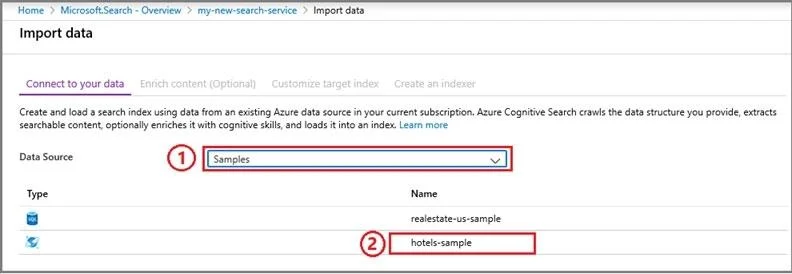
Step 6 - Connect to data -> Samples -> hotels-sample
hotels-sample is a built-in sample dataset Azure provides. Selecting it auto-configures the Cosmos DB connection string and schema. If you were connecting a real Cosmos DB, you'd provide an account URI and key manually. Skipping this step means no data source - the index would be empty.
Step 7 - Continue to next page Moves to the "Add cognitive skills" (Enrich content) page. You must pass through it even if you skip it.
Step 8 - Skip "Enrich content" AI enrichment (entity extraction, translation, OCR) is not required here. The task only needs English language field configuration, not AI-enriched content. Adding unnecessary skillsets increases cost and complexity. Skipping is intentional and correct.
Step 9 - Configure index, select English for fields
This is the critical constraint in the question. Each text field in the index has a language analyzer setting (e.g., en.microsoft or en.lucene). Setting fields to English ensures:
- The search engine applies English-specific tokenization (stemming, stop words)
- Only English-analyzed fields are retrievable and searchable
If you skip this or leave fields set to the default "Standard Lucene" analyzer, the language constraint is violated - the simulation would fail this requirement.
Step 10 - Finish the wizard
Creates the indexer, which runs immediately to pull data from hotels-sample into the index. Without finishing, no data is indexed and the service is empty.
What Goes Wrong If Steps Are Out of Order or Skipped
| Skipped Step | Consequence |
|---|---|
| Skip Step 2 (create service) | No service to host the index - wizard unavailable |
| Wrong name in Step 3 | Simulation grader fails name validation |
| Skip Step 6 (connect data) | Index exists but is empty |
| Don't skip Step 8 (add enrichment) | Adds cost/complexity; doesn't break it, but wastes time |
| Skip English in Step 9 | Violates the core requirement; exam simulation fails |
| Don't finish Step 10 | Indexer never runs; no searchable documents |
Memory Tip
"Service -> Source -> Skip -> Select English -> Submit"
- Service: Create the search service first
- Source: Connect to hotels-sample data source
- Skip: Skip the enrichment page
- Select English: Configure language analyzer on index fields
- Submit: Finish the wizard to trigger indexing
The English language step is the only non-obvious step - everything else is standard resource creation. Focus your memory there: the wizard's index configuration page has a per-field "Analyzer" dropdown where you must explicitly choose English.
Topics
Community Discussion
No community discussion yet for this question.