
AD0-E716 · Question #23
An Adobe Commerce developer is working on a custom gallery extension. The module uses the Magento\catalog\Model\iinageUploader class for image uploading. The admin controller for custom image…
The correct answer is B. Option B. According to the ImageUploader component guide for Magento 2 developers, the ImageUploader UI component gives users the ability to upload images to the Magento Media Gallery. This component is a variation of the FileUploader component and uses the same configuration settings…
Question
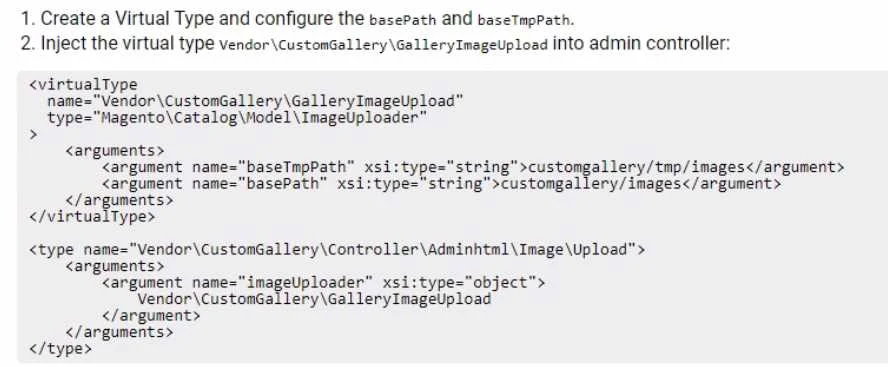
An Adobe Commerce developer is working on a custom gallery extension. The module uses the Magento\catalog\Model\iinageUploader class for image uploading. The admin controller for custom image uploads is Vendor\CustomGallery\Controller\Adminhtml\Image\Upload. The images need to be stored in different basePath and baseTmpPath than the default ones. How can the default imageuploader class be extended and used without affecting the other modules that are already using it? A) B) C)
Exhibit
Options
- AOption A
- BOption B
- COption C
How the community answered
(27 responses)- A11% (3)
- B70% (19)
- C19% (5)
Explanation
According to the ImageUploader component guide for Magento 2 developers, the ImageUploader UI component gives users the ability to upload images to the Magento Media Gallery. This component is a variation of the FileUploader component and uses the same configuration settings. The ImageUploader component uses the Magento\catalog\Model\iinageUploader class for image uploading, which has properties such as basePath and baseTmpPath that define where the images are stored. To extend the default imageuploader class and use it without affecting the other modules that are already using it, the developer needs to create a virtual type of this class in their module's di.xml file and specify different values for basePath and baseTmpPath. The developer also needs to inject their virtual type into their admin controller using the imageUploader argument. Therefore, option B is the correct answer, as it shows the correct di.xml and controller code to extend and use the imageuploader class. Verified Reference: https://devdocs.magento.com/guides/v2.3/ui_comp_guide/components/image-uploader/
Topics
Community Discussion
No community discussion yet for this question.