
AD0-E716 · Question #19
An Adobe Commerce developer has created a process that exports a given order to some external accounting system. Launching this process using the Magento CLI with the command php bin/magento…
The correct answer is C. Option C. According to the How to use the Magento command-line interface (CLI) guide, to configure and run the Magento CLI, the developer needs to make the bin/magento file executable and then use it to run commands. To create a custom command, the developer needs to create a class that…
Question
An Adobe Commerce developer has created a process that exports a given order to some external accounting system. Launching this process using the Magento CLI with the command php bin/magento my_module:order: process --order_id=<order_id> is required. Example: php bin/magento my_module:order:process --order_id=1245. What is the correct way to configure the command? A) B) C) D)
Exhibits
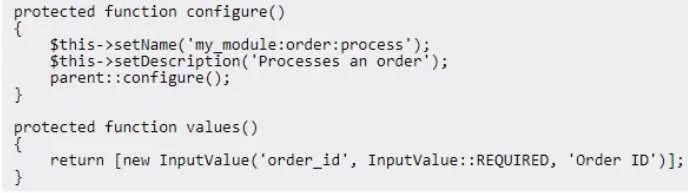

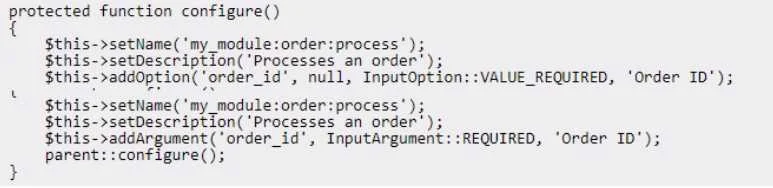

Options
- AOption B
- BOption C
- COption C
- DOption D
How the community answered
(50 responses)- A2% (1)
- B4% (2)
- C88% (44)
- D6% (3)
Explanation
According to the How to use the Magento command-line interface (CLI) guide, to configure and run the Magento CLI, the developer needs to make the bin/magento file executable and then use it to run commands. To create a custom command, the developer needs to create a class that implements \Symfony\Component\Console\Command\Command and define its name, description, arguments, options, and logic. The developer also needs to register the command in the di.xml file of their module using the Magento\Framework\Console\CommandList argument. Therefore, option C is the correct answer, as it shows the correct class and di.xml code to configure the custom command. configuration/magento1/using-the-magento-command-line-interface-cli/
Topics
Community Discussion
No community discussion yet for this question.