
AD0-E716 · Question #17
A logistics company with an Adobe Commerce extension sends a list of reviewed shipment fees to all its clients every month in a CSV file. The merchant then uploads this CSV file to a "file upload"…
The correct answer is A. Option A B. Option B. To display the "file upload" field and process the actual CSV import, the following two requirements The developer must create a new system configuration setting that specifies the path to the CSV file. The developer must create a new controller action that handles the file…
Question
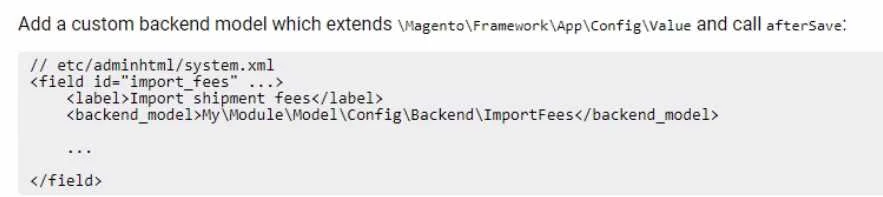
A logistics company with an Adobe Commerce extension sends a list of reviewed shipment fees to all its clients every month in a CSV file. The merchant then uploads this CSV file to a "file upload" field in admin configuration of Adobe Commerce. What are the two requirements to display the "file upload" field and process the actual CSV import? (Choose two.) A) B) C) D)
Exhibit
Options
- AOption A
- BOption B
- COption C
- DOption D
How the community answered
(38 responses)- A74% (28)
- C8% (3)
- D18% (7)
Explanation
To display the "file upload" field and process the actual CSV import, the following two requirements The developer must create a new system configuration setting that specifies the path to the CSV file. The developer must create a new controller action that handles the file upload and import process. The system.xml file is used to define system configuration settings. The following XML snippet shows how to define a new system configuration setting for the CSV file path: <shipment_fees_csv_path>/path/to/csv/file</shipment_fees_csv_path> The Controller\Adminhtml\ShipmentFees controller class is used to handle the file upload and import process. The following code shows how to create a new controller action that handles the file upload and import process: public function uploadAction() $file = $this->getRequest()->getFile('shipment_fees_csv_file'); if ($file->isUploaded()) { $importer = new ShipmentFeesImporter(); $importer->import($file); return $this->redirect('adminhtml/system_config/edit/section/shipment_fees');
Topics
Community Discussion
No community discussion yet for this question.