
9A0-303 · Question #9
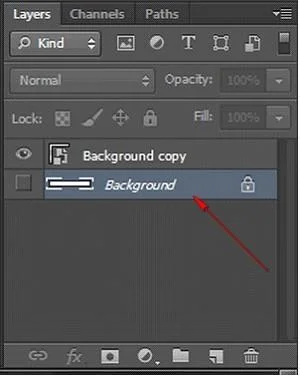
You are working on an image in Photoshop CS6. You have created below shown background layer on the image and you want to apply a Smart filter on it. Which step will you choose to accomplish this task?
The correct answer is C. Select layer and choose Filter > Convert for Smart Filters. If the layer to which you want to apply a Smart Filter is not already a Smart Object layer, select it and choose Filter > Convert for Smart Filters. To apply a Smart Filter, select a Smart Object layer, choose a filter, and specify its settings. The Smart Filter then appears in…
Question
You are working on an image in Photoshop CS6. You have created below shown background layer on the image and you want to apply a Smart filter on it. Which step will you choose to accomplish this task?
Exhibit
Options
- ASelect a Smart Object layer > choose a filter.
- BChoose Filter > Convert for Smart filters.
- CSelect layer and choose Filter > Convert for Smart Filters.
- DIn the Layers panel, double-click Filter Gallery.
How the community answered
(31 responses)- A3% (1)
- B19% (6)
- C71% (22)
- D6% (2)
Explanation
If the layer to which you want to apply a Smart Filter is not already a Smart Object layer, select it and choose Filter > Convert for Smart Filters. To apply a Smart Filter, select a Smart Object layer, choose a filter, and specify its settings. The Smart Filter then appears in the Layers panel. Answer options B, A, and D are incorrect. These are incorrect steps. Chapter: Creative image effects Objective: Topic D: Smart Filters
Topics
Community Discussion
No community discussion yet for this question.