
9A0-303 · Question #2
Which of the following options from the Select menu is used to increase the size of an existing selection?
The correct answer is B. Expand. To increase or decrease the size of an existing selection, use commands in the Select menu. You can also use them to clean up stray pixels left inside or outside a color-based selection. Use a selection tool to make a selection. Choose Select > Modify > Expand or…
Question
Which of the following options from the Select menu is used to increase the size of an existing selection?
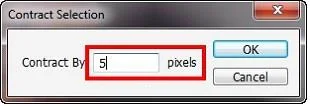
Exhibit
Options
- AContract
- BExpand
- CDeselect
- DReselect
How the community answered
(33 responses)- A18% (6)
- B70% (23)
- C3% (1)
- D9% (3)
Explanation
To increase or decrease the size of an existing selection, use commands in the Select menu. You can also use them to clean up stray pixels left inside or outside a color-based selection. Use a selection tool to make a selection. Choose Select > Modify > Expand or Contract.new-010_!_0001BE For Expand By or Contract
Topics
Community Discussion
No community discussion yet for this question.