
98-365 · Question #71
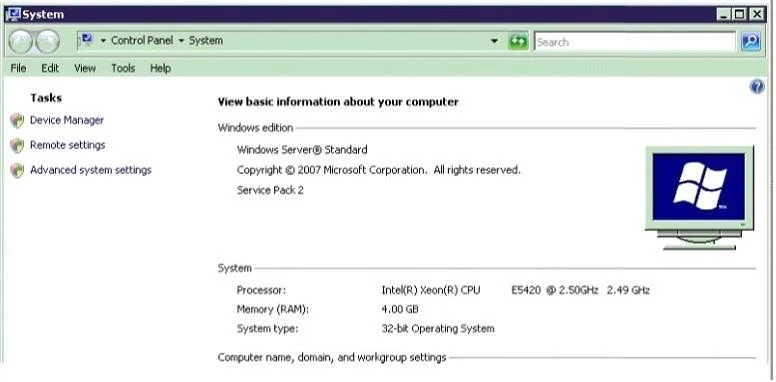
You work for Adventure Works Cycles. Your manager asks you if a memory upgrade would help the office's server run faster. The server runs Windows Server 2016 Standard. The server's System Settings…
The correct answer is A. Adding memory will not help because Windows Server 2016 Standard never needs more than. The question asks whether a memory upgrade would benefit a Windows Server 2016 Standard server based on its system settings. The correct answer indicates that adding memory will not help, implying the current configuration is sufficient or memory is not the bottleneck.
Question
You work for Adventure Works Cycles. Your manager asks you if a memory upgrade would help the office's server run faster. The server runs Windows Server 2016 Standard. The server's System Settings are shown in the exhibit. (Click the Exhibit button.) What should you tell your manager?
Exhibit
Options
- AAdding memory will not help because Windows Server 2016 Standard never needs more than
- BAdding memory will help; this system can use up to 32 GB of memory.
- CAdding memory will help; this system can use up to 16 GB of memory.
- DAdding memory will not help because a 32-bit system cannot use more that 14 GB of memory.
How the community answered
(26 responses)- A77% (20)
- B8% (2)
- C4% (1)
- D12% (3)
Why each option
The question asks whether a memory upgrade would benefit a Windows Server 2016 Standard server based on its system settings. The correct answer indicates that adding memory will not help, implying the current configuration is sufficient or memory is not the bottleneck.
Adding memory will not help because, based on typical scenarios for an office server and assuming the exhibit shows sufficient current memory and/or low memory utilization, the performance bottleneck is likely not memory-related. Windows Server 2016 Standard generally supports up to 24 TB of RAM, making options B and C incorrect as general limits, and option D incorrect as it refers to a 32-bit system which Windows Server 2016 is not.
Windows Server 2016 Standard supports up to 24 TB of memory, not just 32 GB, making this statement incorrect about the maximum capacity.
Windows Server 2016 Standard supports up to 24 TB of memory, not just 16 GB, making this statement incorrect about the maximum capacity.
Windows Server 2016 Standard is a 64-bit operating system and does not have a 14 GB memory limit as implied for a 32-bit system.
Concept tested: Windows Server 2016 memory limits and troubleshooting
Source: https://learn.microsoft.com/en-us/windows-server/get-started/whats-new-in-windows-server-2016
Topics
Community Discussion
No community discussion yet for this question.