
98-365 · Question #467
Andrew purchases a laptop that has the Windows 2000 Professional operating system. He wants to know about the BIOS version of the computer. Which of the following steps will he take to determine the…
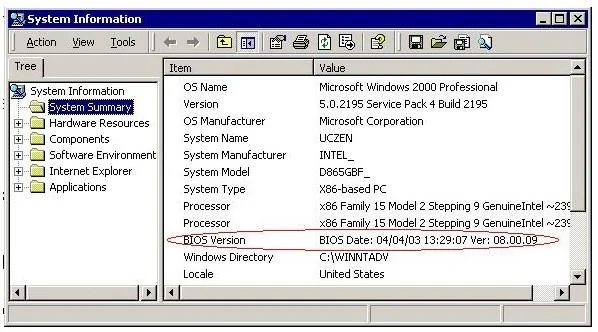
The correct answer is B. Click the Start menu, choose Programs > Accessories > System Tools > System Information. D. In the System Information window, click the System Summary folder in the left pane. In order to determine the version of the BIOS on Windows 2000/XP computers, the following steps have to be taken: Click the Startmenu, choose Programs > Accessories> System Tools> System Information. In the System Information window, click the System Summary folder in the left…
Question
Andrew purchases a laptop that has the Windows 2000 Professional operating system. He wants to know about the BIOS version of the computer. Which of the following steps will he take to determine the version of the BIOS? Each correct answer represents a part of the solution. Choose two.
Exhibit
Options
- AIn the System Information window, click the Hardware Resources folder in the left pane.
- BClick the Start menu, choose Programs > Accessories > System Tools > System Information.
- CClick the Start menu, choose Programs > Accessories > Communications > System Information.
- DIn the System Information window, click the System Summary folder in the left pane.
How the community answered
(14 responses)- A7% (1)
- B86% (12)
- C7% (1)
Explanation
In order to determine the version of the BIOS on Windows 2000/XP computers, the following steps have to be taken: Click the Startmenu, choose Programs > Accessories> System Tools> System Information. In the System Information window, click the System Summary folder in the left pane. Answer: C is incorrect. The System Information utility will not be found using this step.
Topics
Community Discussion
No community discussion yet for this question.