
98-365 · Question #462
Adam works as a Desktop Support Technician for Umbrella Inc. The company has a Windows-based network. All client computers run Windows 10 Ultimate operating system. Andy, Managing Director of the…
The correct answer is A. Enable the USB selective suspend option from the Advanced Power Settings. Adam will enable the USB selective suspend option from the Advanced Power Settings. USB devices draw power from a computer. USB selective suspend option in Windows 10 can be used to reduce the power usage of some USB devices. USB selective suspend is enabled in Windows 10 by…
Question
Adam works as a Desktop Support Technician for Umbrella Inc. The company has a Windows-based network. All client computers run Windows 10 Ultimate operating system. Andy, Managing Director of the company, complains that his laptop is consuming battery very rapidly affecting the performance of the system. Adam inspects his laptop and finds that appropriate power is implemented on the laptop but many USB devices are attached to it. Which of the following steps will Adam take to resolve the problem?
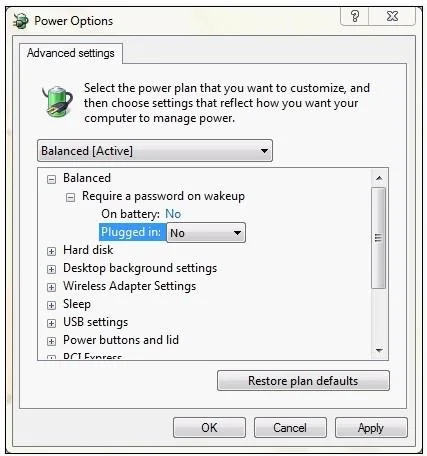
Exhibit
Options
- AEnable the USB selective suspend option from the Advanced Power Settings.
- BConnect all USB devices in one USB hub and then connect it to the laptop.
- CAsk Andy to disconnect all USB devices.
- DRemove the USB response from the Registry Editor.
How the community answered
(23 responses)- A74% (17)
- B17% (4)
- C4% (1)
- D4% (1)
Explanation
Adam will enable the USB selective suspend option from the Advanced Power Settings. USB devices draw power from a computer. USB selective suspend option in Windows 10 can be used to reduce the power usage of some USB devices. USB selective suspend is enabled in Windows 10 by default when laptop runs on battery. Advance Power Plan settings are used to customize the power setting according to the individual computer. To configure the advanced power plan settings, click the Change Advanced Power Settings item in the Edit Plan Settings dialog box. Unlike the basic plan settings, only a user with elevated privileges can modify advanced power plan settings. The advanced plan settings are shown below:
Topics
Community Discussion
No community discussion yet for this question.