
98-365 · Question #365
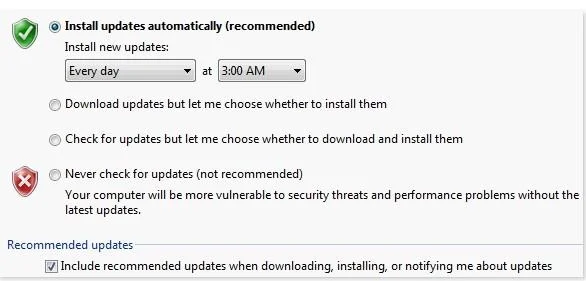
You have a desktop computer that runs Windows Vista Ultimate. Windows Update is configured as shown in the image below: Windows Update is prompting you that an optional update is available. However…
The correct answer is C. Hide the optional update. In order to accomplish the task, you will have to hide the optional update by right-clicking on the update you want to hide, and selecting the Hide updateoption. The Hide updateoption stops Windows from notifying you about updates that you have already decided not to download…
Question
You have a desktop computer that runs Windows Vista Ultimate. Windows Update is configured as shown in the image below:
Windows Update is prompting you that an optional update is available. However, you do not want to install this update. When you view Windows Update, you get the following message:
You are required to configure Windows Update in such a manner that it does not notify you every now and then about its optional update. Which of the following actions will you take to accomplish the task?
Exhibits

Options
- AIn the Windows Update configuration, select the Never check for updates option.
- BDelete the optional update.
- CHide the optional update.
- DIn the Windows Update configuration, select the Check for updates but let me choose
How the community answered
(26 responses)- B8% (2)
- C88% (23)
- D4% (1)
Explanation
In order to accomplish the task, you will have to hide the optional update by right-clicking on the update you want to hide, and selecting the Hide updateoption. The Hide updateoption stops Windows from notifying you about updates that you have already decided not to download or install. Answer: D and A are incorrect. By changing the Windows Update configuration, Windows will not be able to automatically update the computer with the latest updates available. Moreover, it will increase the administrative burden on you to regularly check for updates and implement them if Answer: B is incorrect. By deleting the optional update, you will not be notified for some time, but later on the update will be downloaded again because of the auto-update settings. Then again this update will be prompted.
Topics
Community Discussion
No community discussion yet for this question.