
98-365 · Question #156
Which of the following tools will you use to view information about the use of hardware and software resources of a particular system in real time?
The correct answer is D. Resource Monitor. You should use Resource Monitor to view information about the use of hardware and software resources of a particular system in real time. Resource Monitor is a suite of administration tools designed to provide a quick overview of a single user interface. It acts as a mediator…
Question
Which of the following tools will you use to view information about the use of hardware and software resources of a particular system in real time?
Exhibit
Options
- AEvent Viewer
- BPerformance Monitor
- CServer Manager
- DResource Monitor
How the community answered
(36 responses)- A3% (1)
- B6% (2)
- C3% (1)
- D89% (32)
Explanation
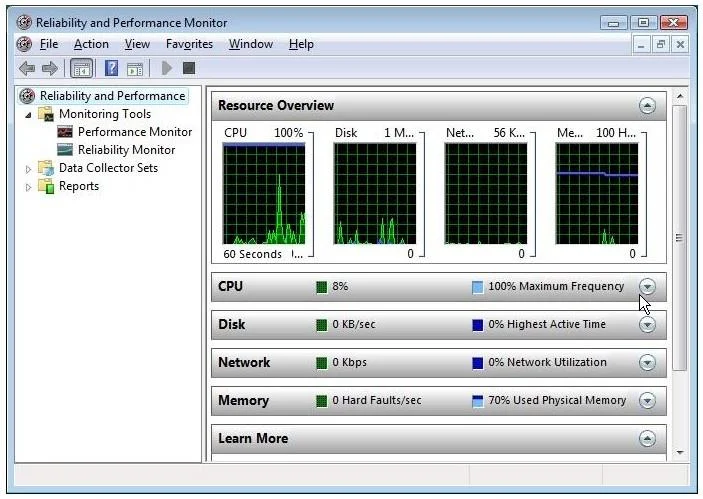
You should use Resource Monitor to view information about the use of hardware and software resources of a particular system in real time. Resource Monitor is a suite of administration tools designed to provide a quick overview of a single user interface. It acts as a mediator between the Cluster service and the resource dynamic link library. It can be launched from the start menu or from the Task Manager using the Performance tab. Resource Monitor can be accessed by searching in the Reliability and Performance monitor. Following is the default overview of Resource Monitor: Answer: B is incorrect. Performance Monitor is a Windows tool that monitors system and network resources. It is used to get statistical data about the hardware and software components of a Answer: A is incorrect. The Event Viewer allows checking of the log of multiple servers. Diagnostic logging helps in figuring out problems on several servers (with the databases on those servers), and for the diagnostic logging, the user can view event logs with the Event Viewer in Windows or the Web Event Viewer in SharePoint Central Administration. Answer: C is incorrect. Server Manager is a primary tool available in Windows Server 2016. It manages and secures multiple server roles in an enterprise. The Server Manager console allows an administrator to perform the following tasks: Install Windows Server roles and features. View the Event Viewer logs. Access performance monitoring tools, Device Manager, Task Scheduler, Windows Firewall with Advanced Security, Services, Local Users and Groups, Windows Server Backup, and Disk
Topics
Community Discussion
No community discussion yet for this question.