
98-349 · Question #160
Which of the following steps will you take to configure automatic updates? Each correct answer represents a part of the solution. Choose all that apply.
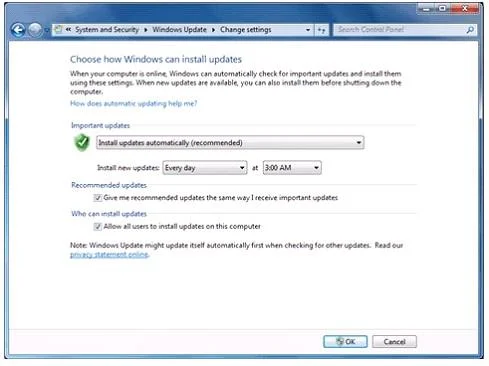
The correct answer is A. Under Windows Update, click "Turn automatic updating on or off". C. Open the Control Panel and click System and Security. (If the Control Panel is not in Category D. Configure the update options as needed, and click OK. Take the following steps to configure automatic updates: 1. Open the Control Panel and click System and Security. (If the Control Panel is not in Category view, click Windows Update, and then click Change settings.) 2. Under Windows Update, click "Turn automatic updating on or…
Question
Exhibit
Options
- AUnder Windows Update, click "Turn automatic updating on or off".
- BOpen the Control Panel and click Add or Remove Program.
- COpen the Control Panel and click System and Security. (If the Control Panel is not in Category
- DConfigure the update options as needed, and click OK.
How the community answered
(37 responses)- A86% (32)
- B14% (5)
Explanation
Take the following steps to configure automatic updates: 1. Open the Control Panel and click System and Security. (If the Control Panel is not in Category view, click Windows Update, and then click Change settings.) 2. Under Windows Update, click "Turn automatic updating on or off". The Change Settings 3. Configure the update options as needed, and click OK.
Topics
Community Discussion
No community discussion yet for this question.