
77-885 · Question #97
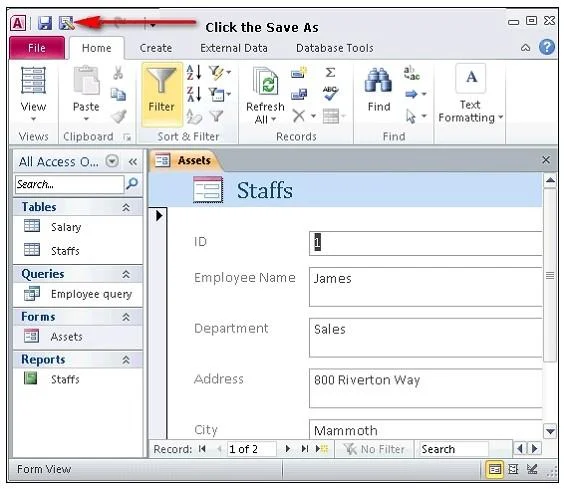
You have opened an Access form in the Design view. The form has header and footer. You want to save the entire form as the report. What will you do?
The correct answer is A. Click the Save As button and choose the Report option. In order to save the entire form as the report, you should open the form in the Design view and then click the Save As button. Choose the Save As Report option. The form header and footer are used as the report header and footer after saving the form as the Answer: B is…
Question
Exhibit
Options
- AClick the Save As button and choose the Report option.
- BClick Report Wizard and follow the procedure.
- CAccess does not allow you to save the form as the report.
- DDelete the form header and footer and click the Save As Report option.
How the community answered
(52 responses)- A71% (37)
- B17% (9)
- C8% (4)
- D4% (2)
Explanation
In order to save the entire form as the report, you should open the form in the Design view and then click the Save As button. Choose the Save As Report option. The form header and footer are used as the report header and footer after saving the form as the Answer: B is incorrect. If you click Report Wizard, a new report is created based on the form. Answer: D is incorrect. You are not required to delete the form header and footer to save the form Answer: C is incorrect. Access allows you to save the form as the report.
Topics
Community Discussion
No community discussion yet for this question.