
77-885 · Question #108
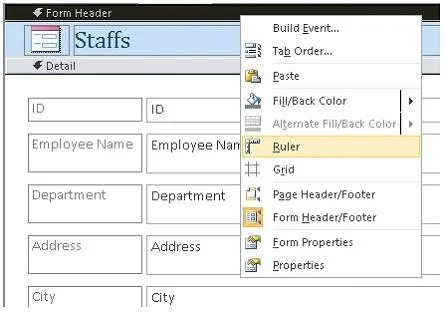
You have a form named Assets created in Microsoft Office Access 2010. You have to make some changes in the formatting of the form. For this reason, you have opened the form in the Design view. Now…
The correct answer is B. Right-click on Form Header, and choose the Ruler and Grid options. In order to accomplish the task, you should take the following steps: Right-click on Form Header. Choose the Ruler and Grid options. After choosing both of these options, ruler and grid will be displayed on the form. Answer: D is incorrect. The Tools option is not used for…
Question
Exhibit
Options
- AClick on the Format contextual tab and choose the Conditional Formatting option.
- BRight-click on Form Header, and choose the Ruler and Grid options.
- CRight-click on the form name and choose the Format option.
- DClick on the Design contextual tab and choose the Tools option.
How the community answered
(25 responses)- A8% (2)
- B76% (19)
- C4% (1)
- D12% (3)
Explanation
In order to accomplish the task, you should take the following steps: Right-click on Form Header. Choose the Ruler and Grid options. After choosing both of these options, ruler and grid will be displayed on the form. Answer: D is incorrect. The Tools option is not used for displaying ruler and grid on the form. Answer: A is incorrect. Conditional Formatting does not include any option for ruler and grid. Answer: C is incorrect. When you right-click the form, it does not show the Format option.
Topics
Community Discussion
No community discussion yet for this question.