
77-885 · Question #87
In which of the following views does the program window open when a user starts Microsoft Office Access 2010 without opening a database?
The correct answer is A. Backstage view. The program window opens in the Backstage view when a user starts Microsoft Office Access 2010 without opening a database. The Backstage view is a full-screen user interface model in which commands related to managing MS Access and Access database are arranged in the form of…
Question
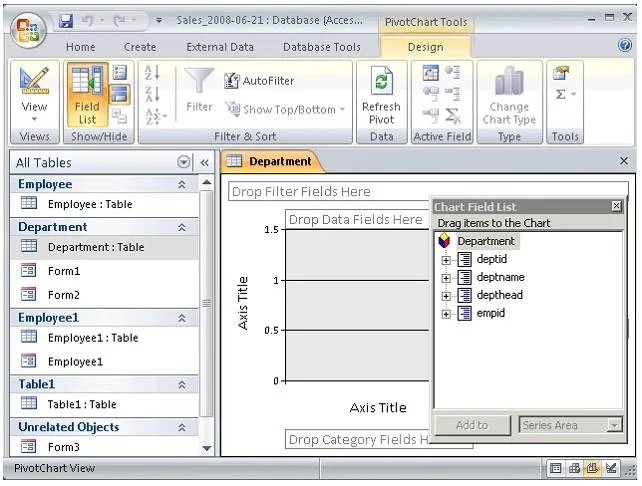
Exhibit
Options
- ABackstage view
- BPivotTable view
- CDesign view
- DPivotChart view
How the community answered
(40 responses)- A73% (29)
- B15% (6)
- C5% (2)
- D8% (3)
Explanation
The program window opens in the Backstage view when a user starts Microsoft Office Access 2010 without opening a database. The Backstage view is a full-screen user interface model in which commands related to managing MS Access and Access database are arranged in the form of buttons and pages. The File tab in the upper-left corner of the program window displays the Backstage view. The Backstage view allows a user to create, save, and check hidden metadata or personal information. It also helps in discovering and using the features that are not related to the authoring features on the Ribbon. Answer: D is incorrect. The PivotChart view of a table can be used to display the data of a table in the desired format using a graph. This view cannot be used to create or delete a field or modify its properties. The data can be filtered according to fields. When the PivotChart view is opened, a blank work area is displayed and the columns of the table are displayed in the Chart Field List window. A user has to drag and drop the fields to view the desired result. The PivotChart view uses an Office Chart Component and helps a user to create dynamic and interactive charts. Answer: B is incorrect. The PivotTable view of a table can be used to display the data of a table in the desired format. This view cannot be used to create or delete a field or modify its properties. The data can be filtered according to fields. When the PivotTable view is opened, a blank work area is displayed and the columns of the table are displayed in the Pivot Table Field List window. A user has to drag and drop the fields to view the desired result. Answer: C is incorrect. The Design view of a table displays its fields and datatypes. New fields can be added to the table and assigned to a datatype. A user cannot insert data in this view. The datatype of a field can be formatted and other table properties such as field size, validation rule, etc., can be set for the field.
Topics
Community Discussion
No community discussion yet for this question.