
77-885 · Question #70
Which of the following ribbons available in Microsoft Office Access 2010 allows you to import, export, and link external data available in various formats?
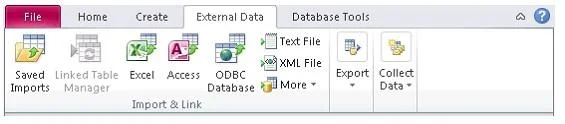
The correct answer is D. External Data. The various functions that an Access user can perform using the External Data ribbon are as To import, export, and link external data available in various formats To assemble and update data via emailed HTML forms To save import and export specifications To work with SharePoint…
Question
Exhibit
Options
- ADatabase Tools
- BCreate
- CHome
- DExternal Data
How the community answered
(56 responses)- A13% (7)
- B4% (2)
- C7% (4)
- D77% (43)
Explanation
The various functions that an Access user can perform using the External Data ribbon are as To import, export, and link external data available in various formats To assemble and update data via emailed HTML forms To save import and export specifications To work with SharePoint lists while offline To move selected objects or the complete database to a SharePoint site Answer: C is incorrect. The various functions that an Access user can perform using the Home ribbon are as follows: To select the Datasheet, Form, Report, Layout, and Design views To perform Clipboard operations To specify font properties To format memo fields with HTML To refresh, add, delete, save, sort, filter, find, and spell check records Answer: B is incorrect. The various functions that an Access user can perform using the Create ribbon are as follows: To create a new blank table, a table from a template in the Datasheet view, or an empty table in To create a SharePoint list and a table that links to that list To create a form or report bound to a table or query that is selected in the Navigation pane To create a new query, macro, module, or class module Answer: A is incorrect. The various functions that an Access user can perform using the Database Tools ribbon are as follows: To open the VBA editor for a module To run a macro, create a shortcut menu from a macro, and convert a macro to VBA To open the Relationships window to create or edit table relationships To show or hide the Object Dependencies pane, property sheet for an object, and message bar To run the Database Documenter, Performance Analyzer, and Table Analyzer Wizard To move tables to a back-end Access database or upsize tables and queries to SQL Server 2005 To run the Linked Table Manager for linked Access tables To create and edit a switchboard with the Switchboard Manager To encrypt the database and set a database password To manage Access add-ins To make an execute-only database by stripping out VBA source code
Topics
Community Discussion
No community discussion yet for this question.