
77-885 · Question #135
Which of the following steps will you take to create a blank database in Microsoft Office Access 2010?
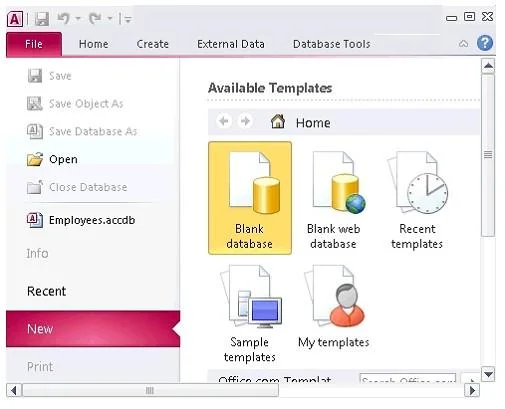
The correct answer is D. File > New > Blank Database. Take the following steps to create a blank database in Microsoft Office Access 2010: 1.Open Microsoft Office Access 2010. 2.Click the File tab and then click the New button. 3.Click Blank Database. 4.Type a name for the database. 5.Click the Create button. Answer: B, C, and A…
Question
Exhibit
Options
- ADatabase Tools > Create > New
- BHome > Create > Database
- CCreate > New > Blank Database
- DFile > New > Blank Database
How the community answered
(19 responses)- A11% (2)
- B5% (1)
- C5% (1)
- D79% (15)
Explanation
Take the following steps to create a blank database in Microsoft Office Access 2010: 1.Open Microsoft Office Access 2010. 2.Click the File tab and then click the New button. 3.Click Blank Database. 4.Type a name for the database. 5.Click the Create button. Answer: B, C, and A are incorrect. These are not valid steps for creating a blank database in Microsoft Office Access 2010. Exam Questions, Study Guides, Practice Tests. Lead the way to help you pass any IT Certification exams, 100% Pass Guaranteed or Full Refund. Especially Cisco, CompTIA, Citrix, EMC, HP, Oracle, VMware, Juniper, Check Point, LPI, Nortel, EXIN and so on. Our Slogan: First Test, First Pass. Help you to pass any IT Certification exams at the first try. You can reach us at any of the email addresses listed below. Any problems about IT certification or our products, you could rely upon us, we will give you satisfactory answers in 24 hours.
Topics
Community Discussion
No community discussion yet for this question.