
77-885 · Question #114
You work as a Database Designer for Tech Perfect Inc. The company has a Windows Vista-based computer with Microsoft Office 2010 installed on it. You want to ensure that the databases created in…
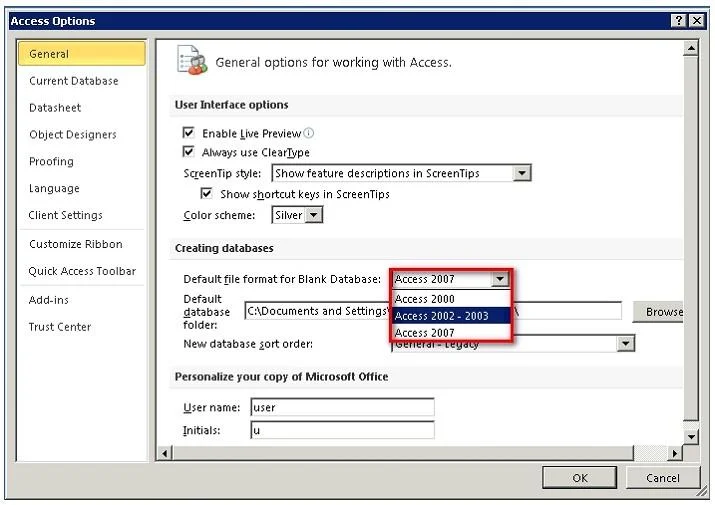
The correct answer is A. General. In order to accomplish the task, you will choose the General option in the Access Options dialog box. This option opens a page that includes the Default file format drop-down list as shown in the image given below: You can change the format of any of the previous versions of…
Question
Exhibit
Options
- AGeneral
- BObject Designers
- CClient Settings
- DCurrent Database
How the community answered
(18 responses)- A72% (13)
- B11% (2)
- C6% (1)
- D11% (2)
Explanation
In order to accomplish the task, you will choose the General option in the Access Options dialog box. This option opens a page that includes the Default file format drop-down list as shown in the image given below: You can change the format of any of the previous versions of Microsoft Access. Answer: D is incorrect. The Current Database option includes the settings for the currently used
Topics
Community Discussion
4 Prof. SaraJun 23, 2026
The answer is A, General, because the Default file format setting lives under File, Options, General, and that is where you change the blank database format from Access 2007-2010 to Access 2003, applying that choice globally to every new database you create going forward. Remember this with the mnemonic "G for Global default," since General is where Access stores the settings that affect the entire application, not just one object or one open file.
 Dragomir B.Jun 23, 2026
That mnemonic is fine for the shelf but do not let it crowd out the practical follow-up: changing that General setting only governs blank databases you create from that point forward, so any existing .accdb files you open stay .accdb until you explicitly do a Save As to the 2003 .mdb format.
 Fatima Z.Jun 26, 2026
Yes, A is your answer, and here is the sticky hook: think "G for General, G for Global defaults," because the General tab in Access Options is exactly where you set the Default file format for ALL new databases, so flipping it to Access 2002-2003 there locks in that older format every single time you hit Create.
Dragomir B.Jun 26, 2026Yeah, General is right. That is where you set the Default file format for new databases, and you just drop it down to Access 2002-2003 from there, nothing fancy about it.