
77-427 · Question #6
Microsoft Excel 2013. While creating forms for a number of users, he is required to repeat some of the actions multiple times. It is a very time consuming process. To resolve the issue, he has…
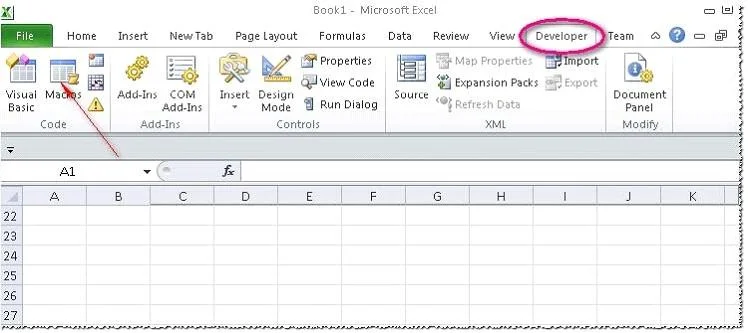
The correct answer is A. Click on the 'Macros' icon in the 'Developer' tab under the 'Code' category to run a Macro. B. The Macro will be run in any worksheet of the Workbook. D. The Macro dialogue box appears on the screen which contains a list of Macros in it. E. Run the created Macro by using the shortcut key specified while creating the Macro. Take the following steps to run a Macro: 1. Click on the 'Macros' icon in the 'Developer' tab under the 'Code' category to run a Macro. 2. The Macro dialogue box appears on the screen which contains a list of Macros in it. Select the Macro to run and click the Run button. 3…
Question
Exhibit
Options
- AClick on the 'Macros' icon in the 'Developer' tab under the 'Code' category to run a Macro.
- BThe Macro will be run in any worksheet of the Workbook.
- CPut the workbook in a trusted location.
- DThe Macro dialogue box appears on the screen which contains a list of Macros in it.
- ERun the created Macro by using the shortcut key specified while creating the Macro.
How the community answered
(22 responses)- A82% (18)
- C18% (4)
Explanation
Take the following steps to run a Macro: 1. Click on the 'Macros' icon in the 'Developer' tab under the 'Code' category to run a Macro. 2. The Macro dialogue box appears on the screen which contains a list of Macros in it. Select the Macro to run and click the Run button. 3. The Macro will be run in any worksheet of the Workbook. 4. A user can run the created Macro by using the shortcut key that he has specified while creating the Macro. The macro records the user's mouse clicks and keystrokes while he works and lets him play them back later. The macro can be used to record the sequence of commands that the user uses to perform a certain task. When the user runs the macro, it plays those exact commands back in the same order. Answer option C is incorrect. The benefit of connecting to external data from Microsoft Excel is that a user can automatically update Excel workbooks from the real data source whenever the data source is updated with new information. It is possible that the external data connection might be disabled on the computer. For connecting to the data source whenever a workbook is opened, it is required to enable data connections by using the Trust Center bar or by putting the workbook in a trusted location.
Topics
Community Discussion
No community discussion yet for this question.