
77-427 · Question #4
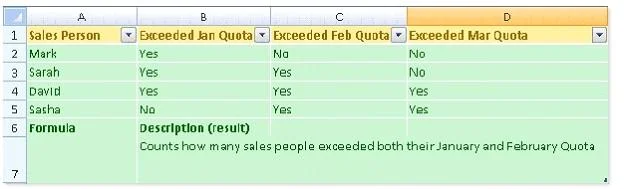
You work as an Office Assistant for Dreams Unlimited Inc. You use Microsoft Excel 2013 for creating various types of reports. You have created a report in the format given below: In the A7 cell, you…
The correct answer is D. COUNTIFS(B2:B5,"=Yes",C2:C5,"=Yes"). In order to get the required result, you will have to insert the following formula in the B7 cell: COUNTIFS(B2:B5,"=Yes",C2:C5,"=Yes") Only Sarah and David have exceeded their January and February quotas, therefore the formula will provide 2 as the result. Answer option C is…
Question
Exhibit
Options
- ACOUNTIF(B2:C5,"=Yes")
- BCOUNTIFS(B2:C5,"=Yes")
- CCOUNTIF(B2:B5,"=Yes",C2:C5,"=Yes")
- DCOUNTIFS(B2:B5,"=Yes",C2:C5,"=Yes")
How the community answered
(39 responses)- A3% (1)
- B13% (5)
- C8% (3)
- D77% (30)
Explanation
In order to get the required result, you will have to insert the following formula in the B7 cell: COUNTIFS(B2:B5,"=Yes",C2:C5,"=Yes") Only Sarah and David have exceeded their January and February quotas, therefore the formula will provide 2 as the result. Answer option C is incorrect. The COUNTIF function of Excel does not support multiple criteria. Answer options A and B are incorrect. This formula will count all the cells that have the value "Yes" in the range B2:C5. As multiple criteria are not applied in the formula, it will provide 6 as the In the A7 cell, you are required to put a formula so that it can fulfill the description provided in the
Topics
Community Discussion
No community discussion yet for this question.