
Microsoft
77-427 · Question #51
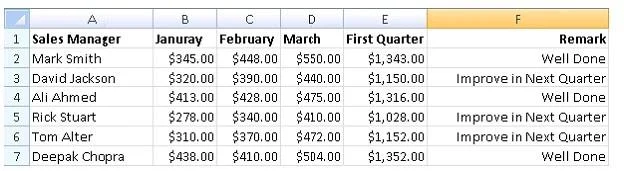
You work as a Sales Manager for Tech Perfect Inc. You are creating a report for your sales team Using Microsoft Excel. You want the report to appear in the following format: You want the Remark…
Sign in or unlock 77-427 to reveal the answer and full explanation for question #51. The question stem and answer options stay visible for context.
Create advanced formulas
Question
You work as a Sales Manager for Tech Perfect Inc. You are creating a report for your sales team Using Microsoft Excel. You want the report to appear in the following format: You want the Remark column to be filled through a conditional formula. The criteria to give the remark is as follows: If the sales of the First Quarter are greater than or equal to 1200, display "Well Done" If the sales of the First Quarter is less than 1200, display "Improve in Next Quarter" You have done most of the entries in a workbook. You select the F2 cell as shown in the image given below: Which of the following conditional formulas will you insert to accomplish the task?
Exhibits
Options
- A=IF(E2>=1200,"Improve in Next Quarter","Well Done")
- B=IF(E2<=1200,"Well Done","Improve in Next Quarter")
- C=IF(E2>=1200,"Well Done","Improve in Next Quarter")
- D=IF(E2>1200,"Improve in Next Quarter","Well Done")
Unlock 77-427 to see the answer
You've previewed enough free 77-427 questions. Unlock 77-427 for full answers, explanations, the timed quiz mode, progress tracking, and the master PDF. Question stem and options stay visible so you can still see what's on the exam.
Topics
#IF function#conditional logic#comparison operators#text output