
74-697 · Question #10
You use Windows Deployment Services (WDS) to deploy Windows operating system images. You create a custom image of Windows Preinstallation Environment (Windows PE). You need to ensure that client…
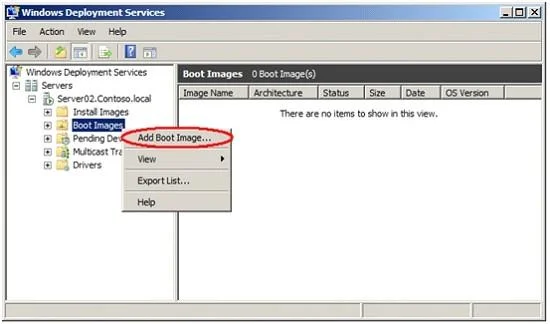
The correct answer is C. Boot Images. Navigate to Windows Deployment Services --> Servers --> <ServerName> -- > Boot Images. Right-Click on Boot Images and select Add Boot Image.... This will open the Add Image Wizard, shown in the following figure: You can see in the following figure that the boot image is now…
Question
You use Windows Deployment Services (WDS) to deploy Windows operating system images. You create a custom image of Windows Preinstallation Environment (Windows PE). You need to ensure that client computers use Pre-Boot Execution Environment (PXE) to load the Windows PE image. To which node in the Windows Deployment Services console should you add the image?
Exhibit
Options
- AInstall Images
- BMulticast Transmissions
- CBoot Images
- DPending Devices
- ELegacy Images
How the community answered
(29 responses)- B14% (4)
- C76% (22)
- D3% (1)
- E7% (2)
Explanation
Navigate to Windows Deployment Services --> Servers --> <ServerName> -- > Boot Images. Right-Click on Boot Images and select Add Boot Image.... This will open the Add Image Wizard, shown in the following figure: You can see in the following figure that the boot image is now available for management and for PXE clients to download. You can see that the image name that you entered in the Image Metadata screen is used to identify the boot image in the console.
Topics
Community Discussion
No community discussion yet for this question.