
74-697 · Question #1
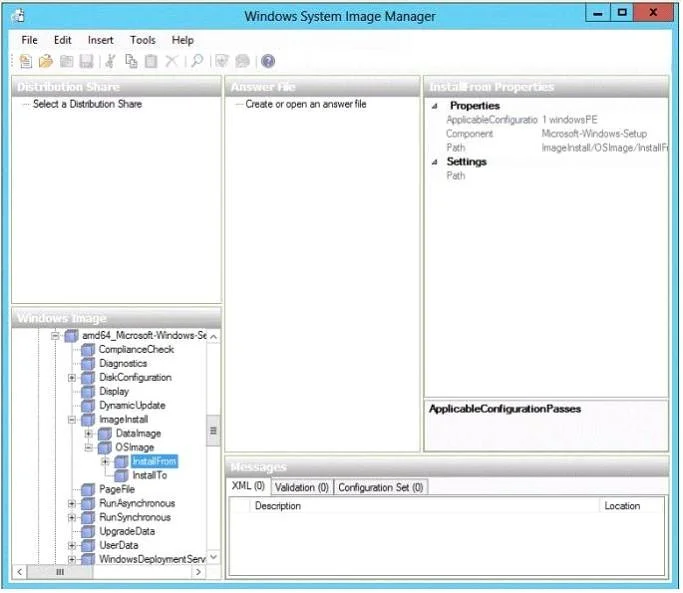
A technician opens Windows System Image Manager as shown in the following exhibit. (Click the Exhibit button.) The technician fails to configure any component settings in Windows System Image…
The correct answer is C. Create an answer file. Windows System Image Manager (Windows SIM) is the tool used to create unattended Windows Setup answer files. The creation of an answer file is achieved by using information from a Windows image (.wim) file and a catalog (.clg) file. Component settings are added to a…
Question
A technician opens Windows System Image Manager as shown in the following exhibit. (Click the Exhibit button.) The technician fails to configure any component settings in Windows System Image Manager (Windows SIM). You need to tell the technician what to do before modifying the component settings in Windows SIM. What should you tell the technician to do?
Exhibit
Options
- ACreate a distribution share.
- BCopy a Windows 8 image to a different location.
- CCreate an answer file.
- DCreate a catalog file.
How the community answered
(15 responses)- A7% (1)
- B7% (1)
- C73% (11)
- D13% (2)
Explanation
Windows System Image Manager (Windows SIM) is the tool used to create unattended Windows Setup answer files. The creation of an answer file is achieved by using information from a Windows image (.wim) file and a catalog (.clg) file. Component settings are added to a configuration pass in the answer file. You can also add packages to be installed during Windows
Topics
Community Discussion
No community discussion yet for this question.