
71301T · Question #43
After the initial provisioning script has been run you see your Avaya Session Border Controller for Enterprise (SBCE) displaying a Registered state in the Web GUI. You click on the install link in…
The correct answer is A. Commissioned. Commissioned is correct because the SBCE installation workflow follows a defined state progression: after a successful install operation triggered from the EMS (Element Management System), the device transitions from Provisioning to Commissioned, indicating the device has been…
Question
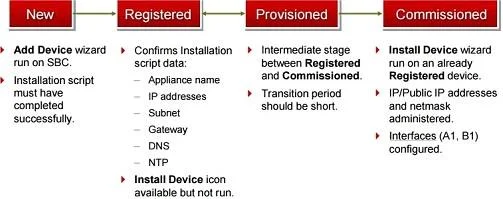
After the initial provisioning script has been run you see your Avaya Session Border Controller for Enterprise (SBCE) displaying a Registered state in the Web GUI. You click on the install link in the EMS System Management > Devices menu to continue the installation. After displaying a status of Provisioning for a short while, which status does the SBCE display?
Exhibit
Options
- ACommissioned
- BUp
- CBusyout
- DMaintenance-Busy
How the community answered
(42 responses)- A88% (37)
- B2% (1)
- C7% (3)
- D2% (1)
Explanation
Commissioned is correct because the SBCE installation workflow follows a defined state progression: after a successful install operation triggered from the EMS (Element Management System), the device transitions from Provisioning to Commissioned, indicating the device has been fully configured and accepted by the EMS as ready for service.
The distractors don't fit the installation workflow: Up (B) refers to an active, in-service call-processing state reached later during normal operation, not immediately after install. Busyout (C) is an administrative state used to gracefully remove a device from service for maintenance, the opposite of what's happening here. Maintenance-Busy (D) indicates the device is undergoing automated maintenance or has a fault condition - again, unrelated to a fresh install completing successfully.
Memory tip: Think of the sequence as R-P-C - Registered → Provisioning → Commissioned - like hiring a contractor: they register interest, you provision the job details, then they're officially commissioned to work.
Topics
Community Discussion
No community discussion yet for this question.