
Microsoft
70-779 · Question #28
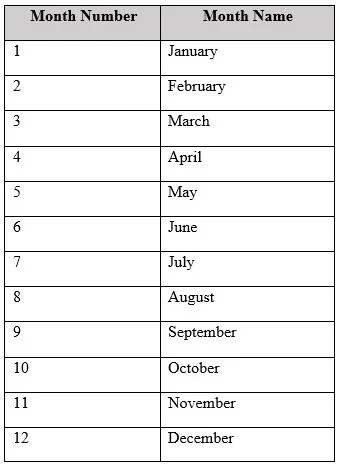
You have the following table. You plan to use [Month Name] as the axis in a PivotChart. You need to ensure that whenever [Month Name] is used in a chart, the months are displayed chronologically by…
Sign in or unlock 70-779 to reveal the answer and full explanation for question #28. The question stem and answer options stay visible for context.
Model data by using Microsoft Excel
Question
You have the following table. You plan to use [Month Name] as the axis in a PivotChart. You need to ensure that whenever [Month Name] is used in a chart, the months are displayed chronologically by default. What should you do?
Exhibit
Options
- ASort the [Month Name] column by [Month Name].
- BChange the Data Type of [Month Name] to Date.
- CSort the [Month Name] column by [Month Name].
- DAdd a calculated column named [ID] that use the [Month Name] & [Month Number] DAX formula
Unlock 70-779 to see the answer
You've previewed enough free 70-779 questions. Unlock 70-779 for full answers, explanations, the timed quiz mode, progress tracking, and the master PDF. Question stem and options stay visible so you can still see what's on the exam.
Topics
#sort by column#month ordering#calculated column#Power Pivot