
Microsoft
70-779 · Question #117
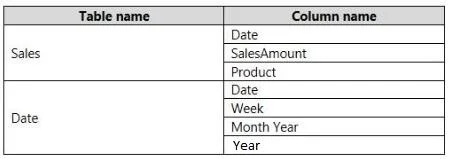
You have the following tables in a data model. You create a PivotTable to display SaleAmount by Month. A sample of the results are shown in the following table. You need to ensure that the data…
Sign in or unlock 70-779 to reveal the answer and full explanation for question #117. The question stem and answer options stay visible for context.
Model data by using Microsoft Excel
Question
You have the following tables in a data model. You create a PivotTable to display SaleAmount by Month. A sample of the results are shown in the following table. You need to ensure that the data appears in chronological order. What should you do?
Exhibit
Options
- AIn the data model, modify the Sort By Column setting for Date[Month Year]
- BFrom PivotTable Fields, add Date[Year] to the Rows area
- CIn the data model, modify the Sort by Column setting for Sales[Date]
- DFrom PivotTable Fields, modify the Field Settings for Date[Month Year]
Unlock 70-779 to see the answer
You've previewed enough free 70-779 questions. Unlock 70-779 for full answers, explanations, the timed quiz mode, progress tracking, and the master PDF. Question stem and options stay visible so you can still see what's on the exam.
Topics
#Sort By Column#data model#chronological order#PivotTable