
70-779 · Question #108
Note: This question is part of a series of questions that present the same scenario. Each question in the series contains a unique solution that might meet the stated goals. Some question sets might…
Sign in or unlock 70-779 to reveal the answer and full explanation for question #108. The question stem and answer options stay visible for context.
Question
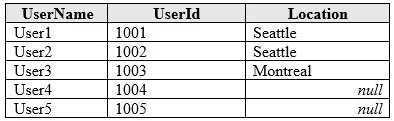
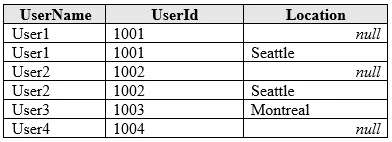
Note: This question is part of a series of questions that present the same scenario. Each question in the series contains a unique solution that might meet the stated goals. Some question sets might have more than one correct solution, while others might not have a correct solution. After you answer a question in this section, you will NOT be able to return to it. As a result, these questions will not appear in the review screen. You have a query named Query1 that retrieves the user information from two Excel files. One of the Excel files does not contain location information. A sample of the data retrieved by the query is shown in the following table. You need to ensure that values in UserName are unique. The solution must ensure that the locations are retained. A sample of desired output is shown in the following table. Solution: You use the Group By function to group the rows by UserName and you specify output columns for UserID and Location by using the Max operation. Does this meet the goal?
Exhibits
Options
- AYes
- BNo
Unlock 70-779 to see the answer
You've previewed enough free 70-779 questions. Unlock 70-779 for full answers, explanations, the timed quiz mode, progress tracking, and the master PDF. Question stem and options stay visible so you can still see what's on the exam.