
70-698 · Question #57
Note: This question is part of a series of a questions that use the same set of answer choices. Each answer choice may be used once, more than once, or not at all. You have a computer named…
The correct answer is G. Subst. The 'subst' command maps a folder path to a virtual drive letter, making each folder within Space1 accessible as an independent drive in Windows Explorer.
Question
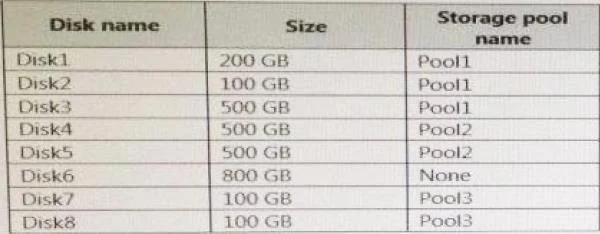
Note: This question is part of a series of a questions that use the same set of answer choices. Each answer choice may be used once, more than once, or not at all. You have a computer named Computer1 that has storage configured as shown in the following table. Pool1 contains a storage space named Space1 that is 300 GB. Pool3 contains a storage space named Space2 that is 100 GB. Pool2 is empty. Space1 contains 10 folders. You need to access each folder as a separate drive from Windows Explorer. What should you use?
Exhibit
Options
- AAdd-PhysicalDisk
- BDiskpart
- CNew-VirtualDisk
- DRemove-PhysicalDisk
- EResize-VirtualDisk
- FSet-StoragePool
- GSubst
- HUpdate-Disk
How the community answered
(40 responses)- B3% (1)
- D3% (1)
- F13% (5)
- G78% (31)
- H5% (2)
Why each option
The 'subst' command maps a folder path to a virtual drive letter, making each folder within Space1 accessible as an independent drive in Windows Explorer.
Add-PhysicalDisk is a PowerShell cmdlet used to add a physical disk to a storage pool and has no ability to map existing folders to drive letters.
Diskpart manages disk partitions and volumes at a low level and cannot assign drive letters to arbitrary folders within an existing volume.
New-VirtualDisk creates a new virtual disk (storage space) inside a storage pool and does not map existing folders to drive letters.
Remove-PhysicalDisk removes a physical disk from a storage pool and is unrelated to folder-to-drive mapping.
Resize-VirtualDisk changes the size of an existing virtual disk and cannot create drive letter mappings for folders.
Set-StoragePool modifies properties of a storage pool such as its friendly name or usage policy and cannot map folders to drive letters.
The 'subst' command (substitute) creates a virtual drive letter that points to a specified folder path, so by running 'subst X: <folder path>' for each of the 10 folders, each folder appears as its own lettered drive in Windows Explorer. This is the correct tool because the task requires presenting existing folders as drives, not creating new virtual disks or modifying storage pool configuration.
Update-Disk refreshes the disk metadata in the operating system and is not capable of creating virtual drive mappings for folders.
Concept tested: Mapping folders to drive letters using subst command
Source: https://learn.microsoft.com/en-us/windows-server/administration/windows-commands/subst
Topics
Community Discussion
No community discussion yet for this question.