
70-698 · Question #55
Note: This question is part of a series of a questions that use the same set of answer choices. Each answer choice may be used once, more than once, or not at all. You have a computer named…
The correct answer is D. Remove-PhysicalDisk. https://technet.microsoft.com/en- us/library/dn782852(v=ws.11).aspx#BKMK_Step6RemoveOldDisk
Question
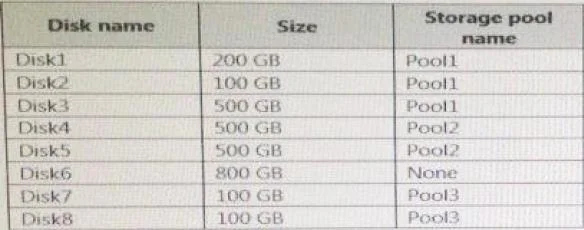
Note: This question is part of a series of a questions that use the same set of answer choices. Each answer choice may be used once, more than once, or not at all. You have a computer named Computer1 that has storage configured as shown in the following table. Pool1 contains a storage space named Space1 that is 300 GB. Pool3 contains a storage space named Space2 that is 100 GB. Pool2 is empty. Disk8 fails. You add a new disk named Disk9 to Pool3. You need to remove Disk8 from Pool3. What should you use?
Exhibit
Options
- AAdd-PhysicalDisk
- BDiskpart
- CNew-VirtualDisk
- DRemove-PhysicalDisk
- EResize-VirtualDisk
- FSet-StoragePool
- GSubst
- HUpdate-Disk
How the community answered
(50 responses)- B2% (1)
- C2% (1)
- D76% (38)
- E6% (3)
- G14% (7)
Explanation
https://technet.microsoft.com/en- us/library/dn782852(v=ws.11).aspx#BKMK_Step6RemoveOldDisk
Topics
Community Discussion
No community discussion yet for this question.