
70-692 · Question #23
A company has an Active Directory Domain Services (AD DS) domain. All client computers run Windows 8.1. You need to configure 20 portable computers so that they sleep after 20 minutes when running…
The correct answer is C. Create a Group Policy object (GPO) that configures the Power Management settings. D. Link the Group Policy object (GPO) to the organizational unit containing the portable. Put the Laptops into an OU. Create an appropriate GPO. Link the GPO to the OU. - Networking power management (not sleep management) refers to the set of features that you can configure to allow the computers in your network to save energy. Local Group Policy would have to be…
Question
A company has an Active Directory Domain Services (AD DS) domain. All client computers run Windows 8.1. You need to configure 20 portable computers so that they sleep after 20 minutes when running on battery power. You must accomplish this goal by using the least amount of administrative effort. Which two actions should you perform? (Each correct answer presents part of the complete solution. Choose two.)
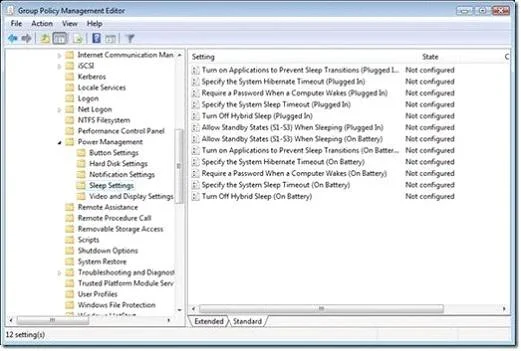
Exhibit
Options
- AEdit the local Group Policy to configure the Shut Down options.
- BCreate a Group Policy object (GPO) that configures the Sleep Management settings.
- CCreate a Group Policy object (GPO) that configures the Power Management settings.
- DLink the Group Policy object (GPO) to the organizational unit containing the portable
- EEdit the local Group Policy to configure the Power Management settings.
How the community answered
(46 responses)- A11% (5)
- B9% (4)
- C76% (35)
- E4% (2)
Explanation
Put the Laptops into an OU. Create an appropriate GPO. Link the GPO to the OU. - Networking power management (not sleep management) refers to the set of features that you can configure to allow the computers in your network to save energy. Local Group Policy would have to be edited locally on each laptop. Managing Power with Group Policy: Part 2 of 3 C:\Users\Chaudhry\Desktop\1.jpg Another related policy setting is Specify the System Sleep Timeout, only the value entered (in seconds) indicates how much idle time elapses before Windows enters sleep mode. Further Information: - Put the Laptops into an OU. - Create an appropriate GPO. - Link the GPO to the OU.
Topics
Community Discussion
No community discussion yet for this question.