nerdexam
Microsoft

70-692 · Question #13

70-692 Question #13: Real Exam Question with Answer & Explanation

The correct answer is A. Public Documents and Public Pictures B. Contacts, Desktop, and Favorites E. My Documents and My Pictures. File History has a predefined set of items that it backs up automatically: all your libraries (both default libraries and custom libraries you created), the Desktop, your Contacts, Internet Explorer favorites and the SkyDrive. - Library example: C:\Users\Chaudhry\Desktop\1.jpg Pr

Question

A company has Windows 8.1 client computers. A user stores files in multiple locations. You need to determine which of the locations will be included in File History. Which three of the following file locations are included in File History? (Each correct answer presents part of the solution. Choose three.

Exhibits

70-692 question #13 exhibit 1
70-692 question #13 exhibit 2

Options

  • APublic Documents and Public Pictures
  • BContacts, Desktop, and Favorites
  • CAll system files
  • DC:\Users and C:\ProgramData
  • EMy Documents and My Pictures
  • FDesktop and Recycle Bin

Explanation

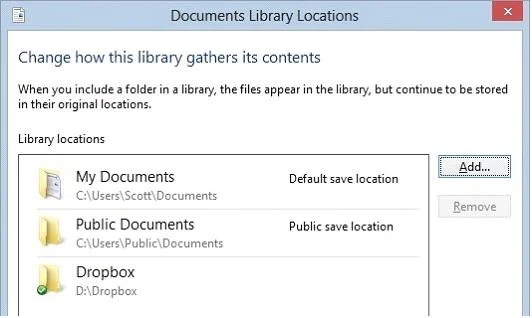
  • File History has a predefined set of items that it backs up automatically: all your libraries (both default libraries and custom libraries you created), the Desktop, your Contacts, Internet Explorer favorites and the SkyDrive. - Library example: C:\Users\Chaudhry\Desktop\1.jpg Protecting user files with File History File History is a backup application that continuously protects your personal files stored in Libraries, Desktop, Favorites, and Contacts folders. It periodically (by default every hour) scans the file system for changes and copies changed files to another location. Every time any of your personal files has changed, its copy will be stored on a dedicated, external storage device selected by you. Over time, File History builds a complete history of changes made to any It's a feature introduced in Windows 8 that offers a new way to protect files for consumers. It supersedes the existing Windows Backup and Restore features of Windows 7. File History only saves copies of files that are in your libraries, contacts, favorites, and on your desktop. If you have folders elsewhere that you want backed up, you can add them to one of your existing libraries or create a new library. Back Up Your Computer with Windows 8 File History File History backs up everything in your libraries: Documents, Music, Pictures, and Videos, as well as the Public folders. That's natural because that's where you store your files. Further Information: Default settings: C:\Users\Chaudhry\Desktop\1.jpg

Community Discussion

No community discussion yet for this question.

Full 70-692 Practice