
70-685 · Question #49
The company purchases 500 USB flash drives from a new hardware vendor and distributes them to the users. The help desk reports that the users are unable to access the new USB flash drives. You need…
The correct answer is D. Request that an administrator modify the device installation restriction policy. Open Group Policy Management and edit the applicable GPO in your Active Directory. Disable autorun: Computer Configuration \ Administrative Templates \ Windows Components \ AutoPlay Policies Turn off Autoplay: Enabled Limit to approved devices: Computer Configuration \…
Question
The company purchases 500 USB flash drives from a new hardware vendor and distributes them to the users. The help desk reports that the users are unable to access the new USB flash drives. You need to ensure that users can save data on the USB flash drives. What should you do?
Exhibits
Options
- AInstruct the help desk to modify the BitLocker settings.
- BInstruct the help desk to modify the Windows Defender settings.
- CRequest that an administrator modify the driver signing policy.
- DRequest that an administrator modify the device installation restriction policy.
How the community answered
(38 responses)- A3% (1)
- B13% (5)
- C5% (2)
- D79% (30)
Explanation
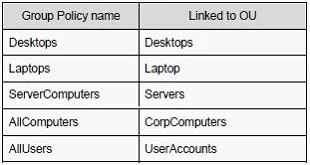
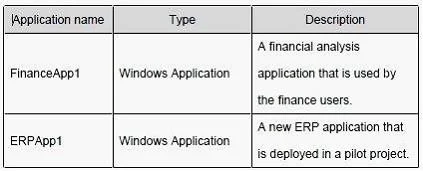
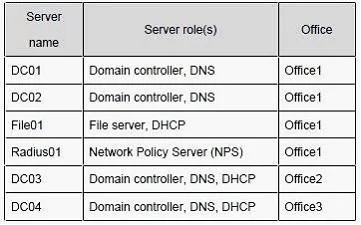
Open Group Policy Management and edit the applicable GPO in your Active Directory. Disable autorun: Computer Configuration \ Administrative Templates \ Windows Components \ AutoPlay Policies Turn off Autoplay: Enabled Limit to approved devices: Computer Configuration \ Administrative Templates \ System > Device Installation \ Device Installation Restrictions Allow installation of devices that match any of these device IDs: (add the corporate device) Prevent installation of devices not described by other policy settings: Enabled Case Study 2 - City Power & Light (QUESTION 50 - QUESTION 54) You are an enterprise desktop support technician for City Power & Light. City Power & Light is a utility company. The company has a main office and a branch office. The main office is located in Toronto. The branch office is located in Boston. The main office has 1,000 employees. The branch office has 10 employees. Active Directory Configuration The network contains a single Active Directory domain named cpandl.com. The functional level of the forest is Windows Server 2008 R2. Server Configuration All servers run Windows Server 2008 R2. The relevant servers in the main office are configured as shown in the following table: All computers in the main office are configured to use DHCP. All computers in the branch office are configured to use static IP addresses. User Information - All user accounts are standard user accounts. - All client computers run Windows 7 Enterprise. - Each portable computer has a PPT P-based VPN connection to the internal network. Corporate Security Guidelines - All users must be granted the least privileges possible. - All locally stored documents must be encrypted by using Encrypting File System (EFS). - The hard disk drives on all port able computers must be encrypted by using Windows BitLocker Drive Encryption (BitLocker). - All encryption certificates must be stored on smart cards. The company is deploying a new application. When users attempt to install the application, they receive an error message indicating that they need administrative privileges to install it.
Topics
Community Discussion
No community discussion yet for this question.