
Microsoft
70-685 · Question #99
Existing Internet Explorer security settings and GPOs are applied throughout the company. However, users are visiting websites known by Internet Explorer to host malicious content. You need to…
Sign in or unlock 70-685 to reveal the answer and full explanation for question #99. The question stem and answer options stay visible for context.
Identify and Resolve Security Issues
Question
Existing Internet Explorer security settings and GPOs are applied throughout the company. However, users are visiting websites known by Internet Explorer to host malicious content. You need to ensure that users cannot visit those websites. Which setting in the GPO should you enable to achieve this goal?
Exhibit
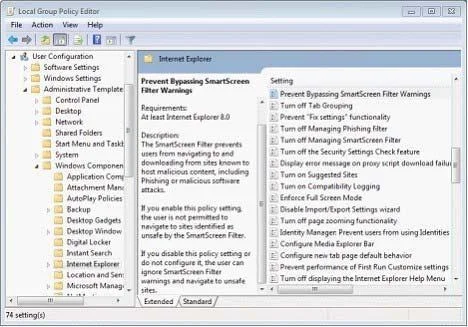
Options
- ATurn off Managing SmartScreen Filter for Internet Explorer 8
- BPrevent Bypassing SmartScreen Filter Warnings
- CTurn on ActiveX Filtering
- DPrevent ignoring certificate errors
- ETurn off Managing Phishing filter
Unlock 70-685 to see the answer
You've previewed enough free 70-685 questions. Unlock 70-685 for full answers, explanations, the timed quiz mode, progress tracking, and the master PDF. Question stem and options stay visible so you can still see what's on the exam.
Topics
#SmartScreen Filter#IE security#malicious websites#GPO