
70-685 · Question #140
A company has computers running the 64-bit version of Windows 7 Enterprise. All computers are joined to an Active Directory Domain Services (AD DS) domain. All users are part of the local…
Sign in or unlock 70-685 to reveal the answer and full explanation for question #140. The question stem and answer options stay visible for context.
Question
A company has computers running the 64-bit version of Windows 7 Enterprise. All computers are joined to an Active Directory Domain Services (AD DS) domain. All users are part of the local Administrators group. A user is trying to install a legacy 32-bit application that requires administrative permissions to install. The user reports that the inst.exe installer does not run. Instead, it shows an "access denied" error message and closes. The user does not see a prompt to grant the application permission to make changes to the computer. You need to ensure that inst.exeruns successfully and can install the application. What should you do? (Choose all that apply.)
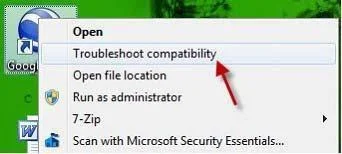
Exhibit
Options
- ARun Disk Defragmenteron the hard disk and then run inst.exe.
- BModify the properties for inst.exeto run as Administrator.
- CRun the Troubleshoot compatibility wizard for inst.exe.
- DEnable the Administrator account, log on, and then run inst.exe.
- EAdvise the user that inst.exe cannot be installed on this system because it is not compatible
- FAdvise the user that inst.exe cannot be installed on this system because it is not compatible
Unlock 70-685 to see the answer
You've previewed enough free 70-685 questions. Unlock 70-685 for full answers, explanations, the timed quiz mode, progress tracking, and the master PDF. Question stem and options stay visible so you can still see what's on the exam.