
Microsoft
70-685 · Question #102
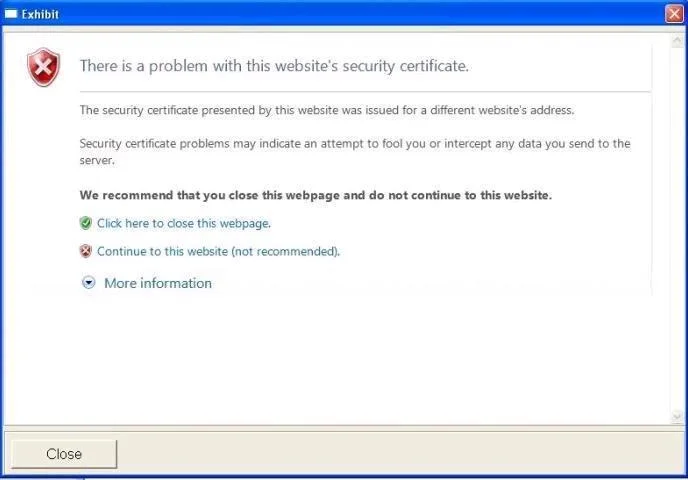
When visiting certain websites, users receive a message in Internet Explorer. The message is shown in the exhibit: You need to ensure that the Internet Explorer settings for all client computers…
The correct answer is C. Enable the Internet Explorer\Internet Control Panel\Prevent ignoring certificate errors setting. See the full explanation below for the reasoning.
Question
When visiting certain websites, users receive a message in Internet Explorer. The message is shown in the exhibit:
You need to ensure that the Internet Explorer settings for all client computers follow company requirements. What should you modify in Group Policy?
Exhibit
Options
- AEnable the Internet Explorer\Internet Control Panel\Security Page\Internet Zone\Turn on Protected
- BDisable the Internet Explorer\Internet Control Panel\Prevent ignoring certificate errors setting.
- CEnable the Internet Explorer\Internet Control Panel\Prevent ignoring certificate errors setting.
- DDisable the Windows Components\Windows Error Reporting\Disable Windows Error Reporting setting.
- EEnable the Windows Components\Windows Error Reporting\Disable Windows Error Reporting setting.
- FEnable the Internet Explorer\Internet Control Panel\Security Page\Internet Zone\Do not prompt for
How the community answered
(40 responses)- A3% (1)
- B5% (2)
- C85% (34)
- F8% (3)
Community Discussion
No community discussion yet for this question.