
70-682 · Question #21
Scenario 3 your convenience, the scenario is repeated in each question. Each question presents a different goal and answer choices, but the text of the scenario is exactly the same in each question…
The correct answer is A. Enable Remote Desktop Connection in the standard computer image. See the full explanation below for the reasoning.
Question
Scenario 3 your convenience, the scenario is repeated in each question. Each question presents a different goal and answer choices, but the text of the scenario is exactly the same in each question in this series. You are an enterprise desktop support technician for Alpine Ski House. Alpine Ski House manages chalets in ski resorts around the world. The main office is located in Vancouver. Chalets are located in Japan, France, and Australia. Alpine Ski House has 500 employees. Active Directory Configuration The network contains an Active Directory forest. The forest contains a domain named alpineskihouse.com. The network contains four Active Directory sites. All sites have high-speed Internet connections and connect to each other by using VPNs. The site information is shown in the following table. DHCP Configuration Microsoft 70-682 Exam The DHCP servers are configured as shown in the following table. Computer Information All corporate computers run Windows 7 Professional and are joined to the alpineskihouse.com domain. All corporate users can access the internal network remotely by using a VPN connection. The VPN connection requires the use of a smart card. During the next year, Alpine Ski House plans to replace the existing VPN with DirectAccess. The company is running a pilot project to test DirectAccess for users in France. Each chalet contains five public computers that run Windows 7 Ultimate. Guests use the public computers to access the Internet. The public computers are members of a workgroup. Every week, a standard image of Windows 7 Ultimate is re-applied to the computers. The help desk reports that remote desktop connections are not enabled on the public computers in the chalets. Consequently, the help desk must instruct local staff to enable remote desktop connections on each public computer. You need to ensure that remote desktop connections are enabled when public computers are deployed in the chalets. What should you do?
Exhibit
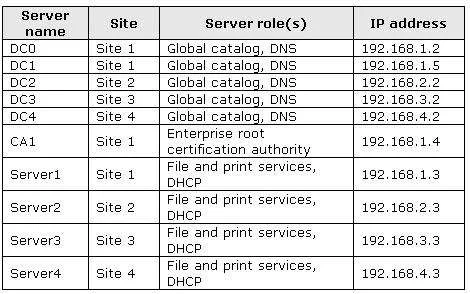
Options
- AEnable Remote Desktop Connection in the standard computer image.
- BInstruct the help desk to enable Windows Remote Management (WinRM) on the public computers.
- CRequest that a network administrator create a logon script for the domain.
- DRequest that a network administrator create a new Group Policy to enable remote desktop connections.
How the community answered
(20 responses)- A80% (16)
- B10% (2)
- C5% (1)
- D5% (1)
Community Discussion
No community discussion yet for this question.