
70-669 · Question #107
You manage a Microsoft Application Virtualization (App-V) environment. Users report that they receive an error when they use a sequenced application. You trace the problem to a registry value…
The correct answer is B. Configure settings on the OSD tab in the Sequencer. E. Use a text editor to manually edit the OSD file. There's basically two ways for you to add script into your existing package; using "OSD Editor" in the Sequencer or editing OSD files directly with suitable text editor (I prefer Notepad++ which is very able and, best of all, a free text editor; just remember to add OSD as…
Question
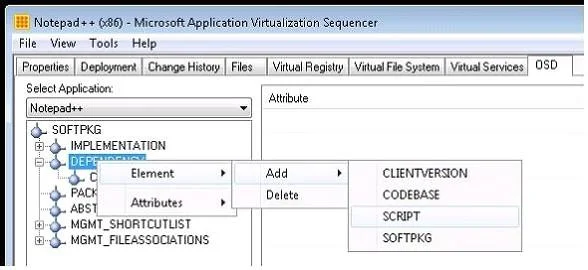
You manage a Microsoft Application Virtualization (App-V) environment. Users report that they receive an error when they use a sequenced application. You trace the problem to a registry value present in the sequenced application. You need to modify the Open Software Description (OSD) file for the sequenced application to reconfigure this registry value. Which two actions should you perform? (Each correct answer presents a complete solution. Choose two.)
Exhibit
Options
- AConfigure settings on the Files tab in the Sequencer.
- BConfigure settings on the OSD tab in the Sequencer.
- CUpdate the OSDSourceRoot registry value on the client with the new registry values.
- DConfigure settings on the Properties tab in the Sequencer.
- EUse a text editor to manually edit the OSD file.
How the community answered
(51 responses)- A12% (6)
- B78% (40)
- C6% (3)
- D4% (2)
Explanation
There's basically two ways for you to add script into your existing package; using "OSD Editor" in the Sequencer or editing OSD files directly with suitable text editor (I prefer Notepad++ which is very able and, best of all, a free text editor; just remember to add OSD as custom extension into style configurator configuration so it will automatically use XML highlighting for OSD files). Application Virtualization Sequencer Console Overview The following tabs are displayed when you view a virtual application in the App-V Sequencer OSD--Displays information about the Open Software Descriptor (OSD) associated with the virtual You can update the files associated with the OSD file by right-clicking the appropriate entry and selecting the action that you want.
Topics
Community Discussion
No community discussion yet for this question.