
70-667 · Question #194
You have a SharePoint Server 2010 Service Pack 1 (SP1) server farm. The farm contains a site collection named Collection1. You need to ensure that you receive an email message if the resource usage…
The correct answer is B. From Central Administration, edit the Site Quota Information. Change the storage limits for a site collection Use these procedures to change the storage limits for a site collection. To change the storage limits for a site collection by using Central Administration Verify that you have the following administrative credentials: You must be…
Question
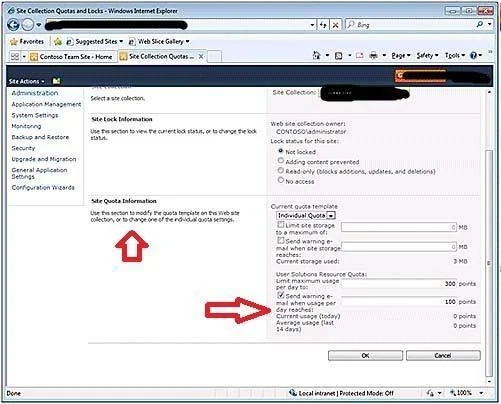
You have a SharePoint Server 2010 Service Pack 1 (SP1) server farm. The farm contains a site collection named Collection1. You need to ensure that you receive an email message if the resource usage of the sandboxed solutions in Collection1 exceeds 100 points during one day. What should you do?
Exhibit
Options
- AFrom Central Administration, edit the Site Lock Information.
- BFrom Central Administration, edit the Site Quota Information.
- CFrom Windows PowerShell, run the Set-ExecutionPolicy cmdlet.
- DFrom Windows PowerShell, run the Set-SPUsageApplication cmdle:
How the community answered
(69 responses)- A12% (8)
- B80% (55)
- C3% (2)
- D6% (4)
Explanation
Change the storage limits for a site collection Use these procedures to change the storage limits for a site collection. To change the storage limits for a site collection by using Central Administration Verify that you have the following administrative credentials: You must be a member of the Farm Administrators group. On the Central Administration home page, click Application Management. On the Application Management page, in the Site Collections section, click Configure quotas and locks. On the Site Collection and Quota Locks page, ensure that the correct site collection is displayed. If you want to change the site collection, in the Site Collection section, expand the Site Collection list, and then click Change Site Collection. Use the Select Site Collection page to select a site collection. If the site collection currently uses a quota template, do the following to specify an individual quota: On the Site Collection Quotas and Locks page, in the Site Quota Information section, expand the Current quota template list, and then select Individual Quota. Leave the Limit site storage to a maximum of check box selected, and then type the new maximum value in megabytes. If you want to send site storage notification e-mail messages to the site collection administrator, Send warning e-mail when site storage reaches check box, and then type the value in megabytes. If you want to limit the maximum resource usage points per day for sandboxed solutions, type the new limit in the Limit maximum usage per day to box. The default is 300 points. If you want an e-mail message to be sent to the site collection administrator when the usage per day threshold is reached, select the Send warning e-mail when usage per day reaches check box, and then type the threshold, in points, in the box. The default is 100 points.
Topics
Community Discussion
No community discussion yet for this question.