
70-663 · Question #80
Your network consists of an Active Directory forest named contoso.com. Contoso.com has an Exchange Server 2010 organization. A subsidiary company has a separate Active Directory forest named…
The correct answer is A. Move all recipients from fabrikam.com to contoso.com. Moving mailboxes from Microsoft Exchange Server 2007 Service Pack 3 (SP3) to Exchange Consider the following: The move process is performed online, and end-users will be able to access their mailboxes during the move. You can't move mailboxes from Exchange 2007 SP1 or earlier…
Question
Your network consists of an Active Directory forest named contoso.com. Contoso.com has an Exchange Server 2010 organization. A subsidiary company has a separate Active Directory forest named fabrikam.com. Fabrikam.com has an Exchange Server 2007 organization. You plan to consolidate both organizations. Your company's consolidation strategy includes the following requirements:
- Support costs must be minimized
- Mailbox access must be easily shared between users
- All e-mail messages must be hosted on Exchange Server 2010 mailbox
servers You need to recommend a solution to meet the requirements of the consolidation strategy. What should you recommend?
Exhibit
Options
- AMove all recipients from fabrikam.com to contoso.com.
- BTransition all servers in fabrikam.com to Exchange Server 2010.
- CIn contoso.com, create a resource mailbox for each recipient in fabrikam.com.
- DMove all computer accounts for the Exchange servers in fabrikam.com to contoso.com.
How the community answered
(49 responses)- A69% (34)
- B8% (4)
- C4% (2)
- D18% (9)
Explanation
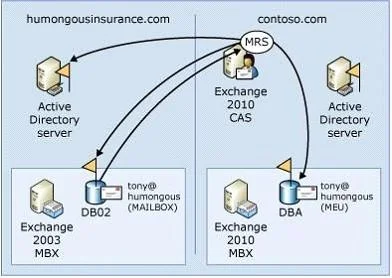
Moving mailboxes from Microsoft Exchange Server 2007 Service Pack 3 (SP3) to Exchange Consider the following: The move process is performed online, and end-users will be able to access their mailboxes during the move. You can't move mailboxes from Exchange 2007 SP1 or earlier. The source Mailbox server must be running Exchange 2007 SP3. Perform the move from a server running Exchange 2010 by using the Exchange Management Console or the move request cmdlets in the Exchange Management Shell. You can't use the Move-Mailbox cmdlets in Exchange 2007 to move mailboxes to Exchange 2010 servers. The data move is managed by the computer on which you run the cmdlet. You can't shut down that session of Exchange until the move completes. The following describes a remote legacy mailbox move scenario: The legacy forest (Humongous Insurance) doesn't contain an Exchange 2010 Client Access server. This scenario is similar to the remote move request process. However, because the remote legacy forest doesn't have an instance of MRSProxy to connect with, MRS in the Contoso forest connects directly to the Humongous Insurance Active Directory server and system mailbox on the Exchange 2003 mailbox database. When you move Exchange 2003 mailboxes to Exchange 2010, the mailbox move will be offline. During the move, the users won't be able to access their mailboxes. When you move Exchange 2007 SP3 to Exchange 2010 mailboxes, the move will be online, and the users can access their mailboxes during the move. The following command is run from the target forest, Contoso.com. New-MoveRequest -Identity '[email protected]'-RemoteLegacy-TargetDatabase DB02 -RemoteGlobalCatalog 'GC01.humongousinsurance.com'-RemoteCredential $Cred- TargetDeliveryDomain 'mail.contoso.com'
Topics
Community Discussion
No community discussion yet for this question.