
70-663 · Question #99
Your network consists of an Active Directory domain that contains the domain controllers shown in the following table. You plan to deploy an Exchange Server 2010 server in each site. You need to…
The correct answer is A. Enable Server2 as a global catalog server. The global catalog maintains an index of the Active Directory database for objects within its Additionally, it stores partial copies of data for all other domains within a forest. Exchange Server relies on global catalog servers to resolve email addresses for users within the…
Question
Your network consists of an Active Directory domain that contains the domain controllers shown in the following table. You plan to deploy an Exchange Server 2010 server in each site. You need to recommend changes to the domain controllers to support the installation of Exchange Server 2010. What should you do?
Exhibit
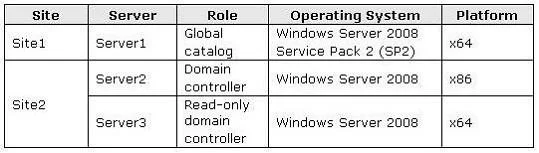
Options
- AEnable Server2 as a global catalog server.
- BEnable Server3 as a global catalog server.
- CUpgrade Server2 to Windows Server 2008 SP2 (x64).
- DUpgrade Server3 to Windows Server 2008 SP2 (x64).
How the community answered
(53 responses)- A72% (38)
- B17% (9)
- C8% (4)
- D4% (2)
Explanation
The global catalog maintains an index of the Active Directory database for objects within its Additionally, it stores partial copies of data for all other domains within a forest. Exchange Server relies on global catalog servers to resolve email addresses for users within the organization. Failure to contact a global catalog server causes emails to bounce, as the recipient's name cannot be resolved. Microsoft Exchange Server 2010 stores all configuration and recipient information in the Active Directory directory service database. When a computer that is running Exchange 2010 requires information about recipients and information about the configuration of the Exchange organization, it must query Active Directory to access the information. Active Directory servers must be available for Exchange 2010 to function correctly. By default, whenever an Exchange 2010 server starts, it binds to a randomly selected domain controller and global catalog server in its own site. You can view the selected directory servers by viewing the properties of the Exchange 2010 server in the Exchange Management Console or by using the Get- ExchangeServer cmdlet in the Exchange Management Shell. You can also use the Set- ExchangeServer cmdlet to configure a static list of domain controllers to which an Exchange 2010 server should bind or a list of domain controllers that should be excluded. You can't deploy an Exchange 2010 server in any site that contains only read-only directory
Topics
Community Discussion
No community discussion yet for this question.